Checkout journey monitoring
A real browser runs add-to-cart → checkout → confirmation on a schedule, with test-safe accounts and inputs. When a step fails, the alert names the step and shows what the browser saw.
Uptime tools confirm your store answered. WooCommerce monitoring with NorthDuty confirms a customer can still add to cart, reach checkout, and complete the flow — by running the journey in a real browser every 15 minutes or faster, and telling you which step broke. Uptime, SSL and store health checks run alongside it in the same project.
Start your 7-day trial — no credit card, free plan after.
Your checkout, run in a real browser every 15 minutes — broken steps named, not guessed.
Journeys first on every store — checkout, login, forms — with store health checks underneath.
A real browser runs add-to-cart → checkout → confirmation on a schedule, with test-safe accounts and inputs. When a step fails, the alert names the step and shows what the browser saw.
Account login, contact and quote forms, and coupon or promo flows are journeys too — AI-suggested from your store, or described in plain text. No scripting, no selectors to maintain.
Deploy detection and the NorthDuty Connect plugin re-run your journeys the moment a plugin, theme or core update lands — catching the breakage that looks fine to an uptime check.
Get NorthDuty Connect on WordPress.orgUptime, SSL, DNS, blank-page and JavaScript-error checks run every 5 minutes by default, including the failed browser-side API calls your storefront makes.
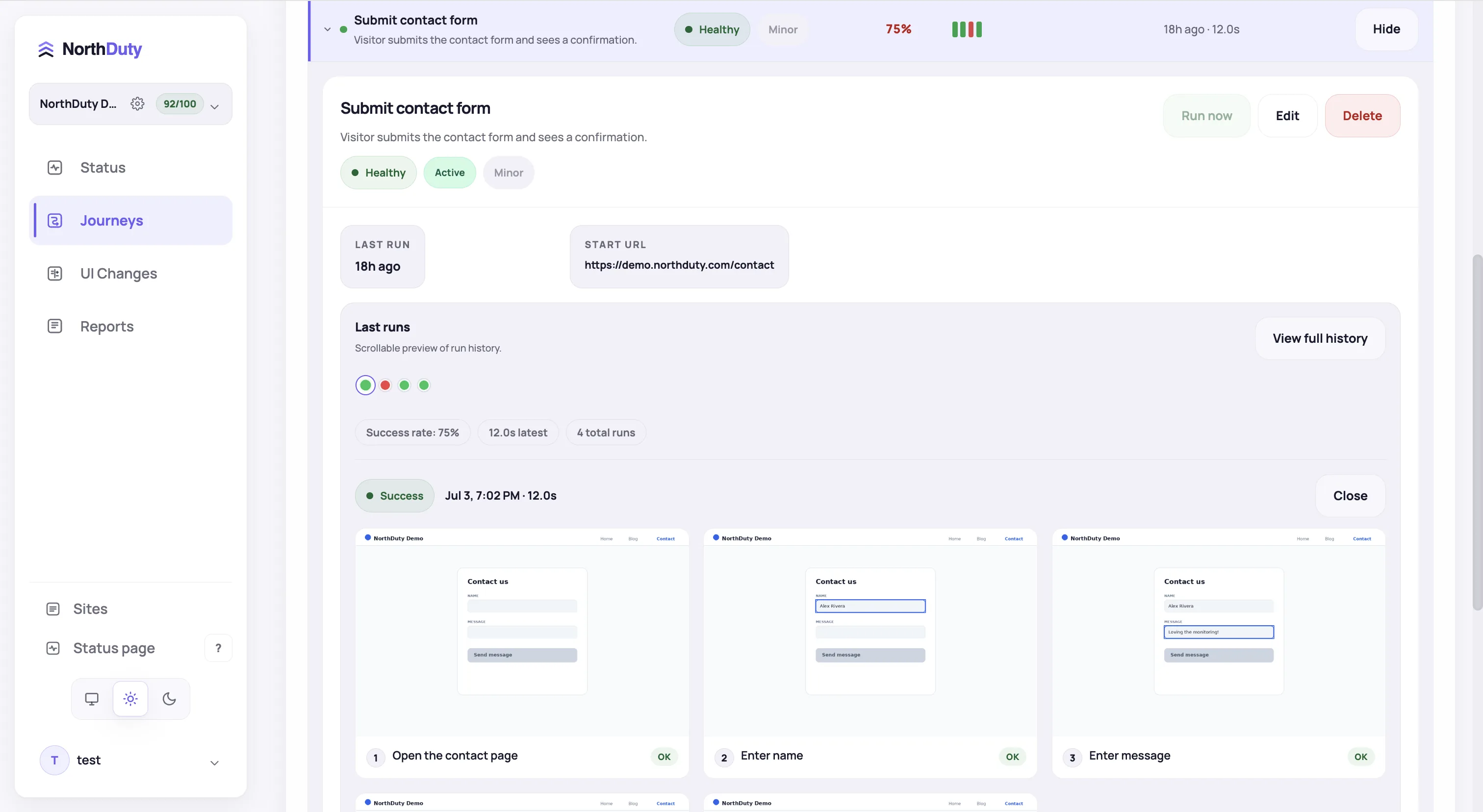
Journeys report every step with what the browser saw, so 'checkout is broken' arrives as 'payment step failed, here is the screen.'
Each run shows the steps the browser took through cart and checkout, which one failed, and the state of the page when it did.
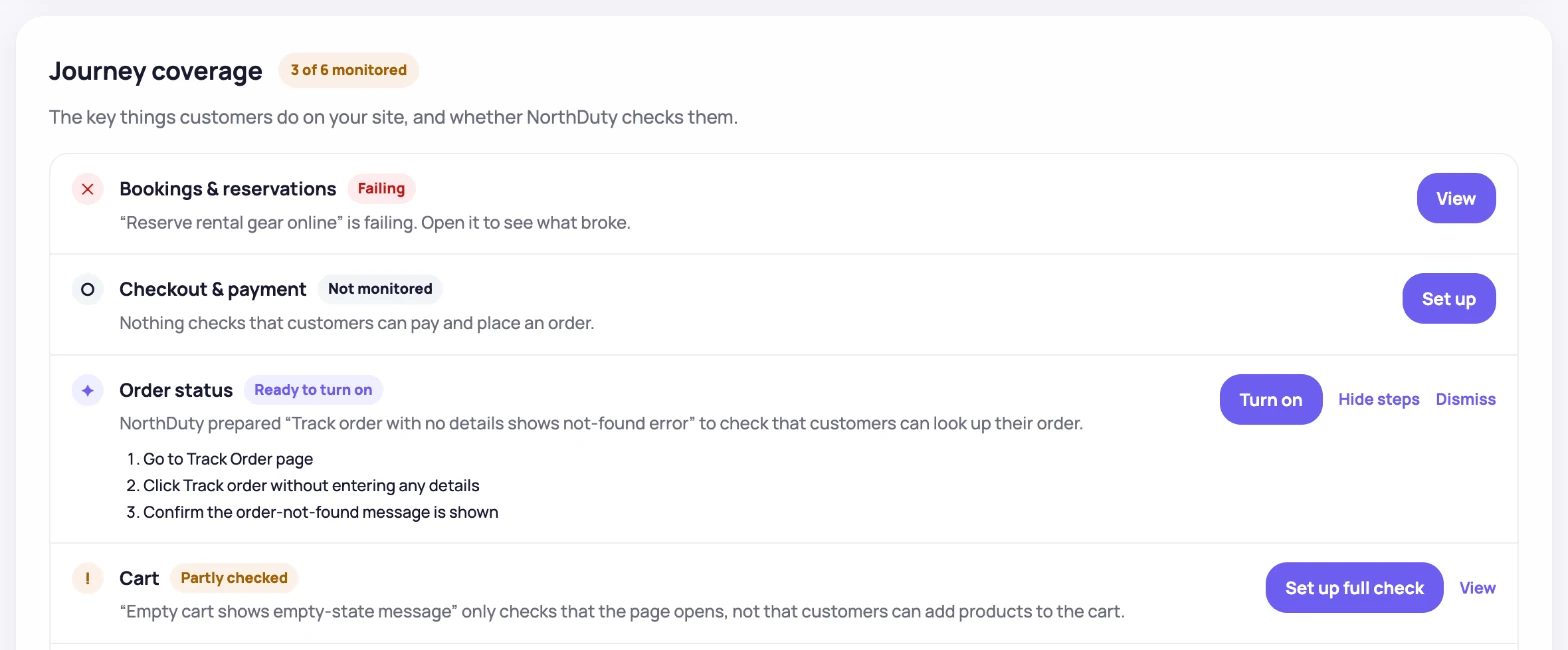
NorthDuty reads the store and proposes the journeys worth watching — cart, checkout, account login — ready to switch on.
Most WooCommerce failures are not outages. A plugin auto-update changes a checkout hook, a theme update hides the place-order button, a payment gateway starts erroring, a caching layer serves a stale cart, the Store API returns the wrong shape — and the homepage keeps loading with a 200 the whole time. A ping check sees a healthy store; the customer sees a checkout that will not finish.
That is why NorthDuty monitors WooCommerce from the outside, the way a customer experiences it: a real Chromium browser walks the cart and checkout flow step by step, keeps a screenshot of every step, and tells you exactly where a customer would have got stuck.
The point is not more data — it is hearing about a broken checkout from a monitor instead of a customer or a client.
From adding the store URL to a monitored checkout in minutes.
Website health monitoring starts every 5 minutes by default — uptime, SSL, DNS, blank pages, broken resources, JavaScript errors.
NorthDuty proposes the flows that matter for a store — checkout, login, contact — and you enable them in one click or describe your own in plain text. Use test-safe accounts and inputs for transactional steps.
A failed journey alerts by email on every plan; paid plans add Slack, SMS, webhooks and more, so the right person hears first.
Failing steps alert the channels your team uses; status pages and scheduled reports keep clients in the loop.
Explore pricing, feature details, solution pages, and related tools connected to this website monitoring use case.
Pricing
NorthDuty plans are sized by how many checkout, signup and login journeys you monitor: Free, $29 Starter, $79 Pro, $199 Business. 7-day trial, no card.
Compare pricing plansHub
Explore NorthDuty features: coverage-aware AI journeys, a cross-site workspace overview, website health checks, and connected incident response.
Browse FeaturesHub
Explore NorthDuty solutions for ecommerce website monitoring, SaaS website monitoring, agency website monitoring, and startup website monitoring.
Browse SolutionsFeature
See NorthDuty monitor a real WooCommerce store: a full checkout journey in a real browser, a free-shipping rule that silently broke, and a booking API that timed out — the step, screenshot and explanation NorthDuty recorded.
Explore Live DemoFeature
NorthDuty runs your checkout, signup, login and form flows in a real browser on a schedule and reports the exact step that failed, with a screenshot.
Explore User Journey MonitoringFeature
Automatically run health checks and user journeys the moment your site is deployed or your CMS publishes a change.
Explore Deployment MonitoringSolution
Monitor ecommerce checkout, add-to-cart, payment paths, blank pages, and JavaScript errors.
View For EcommerceComparison
Shopwarden alternatives compared: monitor a whole client roster, WooCommerce and beyond, on one plan instead of paying per store. Pricing checked Sept 2026.
Compare ShopwardenComparison
CheckView alternatives compared: continuous checkout, signup and form journeys on any site instead of a monthly test-run quota. Pricing checked Sept 2026.
Compare CheckViewArticle
WooCommerce checkout monitoring explained: how to monitor checkout, payment flow, and store health, and why uptime checks alone miss most checkout failures.
Read WooCommerce Checkout Monitoring: The Complete GuideArticle
Learn how to monitor WordPress after a plugin update: why updates silently break WooCommerce checkout without downtime, and how to catch failures first.
Read How to Monitor WordPress After a Plugin UpdateArticle
Learn how to monitor checkout flow in ecommerce so broken steps, payment issues, and API failures do not cost orders.
Read How to Monitor Checkout Flow in EcommerceArticle
8 WooCommerce monitoring tools compared on real checkout testing, check frequency, multi-store pricing and cost — CheckView, Shopwarden, ShopMonitor and more.
Read Best WooCommerce Monitoring Tools (2026)Article
Payment method missing, card fields not loading, orders stuck in Pending? Causes and fixes for Stripe, PayPal and WooPayments — and catching the next one.
Read WooCommerce Payment Gateway Not WorkingArticle
Stripe missing at WooCommerce checkout, card fields not loading, or orders stuck in Pending? Fixes for keys, test mode, webhooks, 3D Secure and Apple Pay.
Read WooCommerce Stripe Not WorkingArticle
Test WooCommerce checkout without real orders: Stripe and WooPayments test mode, test cards, tester-only payments, clean test orders and automated checks.
Read How to Test WooCommerce CheckoutAnswers to common questions about this monitoring feature and when teams should use it.
WooCommerce monitoring watches a store the way a customer experiences it: is the site up, do the key pages render correctly, and — most importantly — can someone actually complete checkout? NorthDuty covers all three by combining real-browser checkout journeys with 5-minute health checks in one project.
You control that. Journeys can run the flow through cart and checkout with test-safe accounts and inputs — for example against a test-mode payment gateway — or stop at a step you choose. Keep payment data and other sensitive values out of journey steps.
That is the core use case. The journey fails at the broken step within one cycle of the update, with a screenshot of what the customer would have seen, and deployment monitoring can run every check immediately after you deploy instead of waiting for the next scheduled slot.
Indirectly. Every health check records the browser-side API calls your pages make and flags the ones that fail, and a checkout journey exercises the cart and checkout endpoints end to end. NorthDuty does not run standalone API monitors.
NorthDuty monitors from the outside, so it adds no code, load, or attack surface to the store, keeps working when WordPress itself is the thing that broke, and covers non-WooCommerce sites in the same roster. Plugin-based tools can read inside data such as plugin versions — if you need CVE tracking, pair NorthDuty with a security scanner.
Add your store, enable the suggested checkout journey, and hear about the next broken checkout from NorthDuty — not from a customer.
7 days with Pro features and limits, no credit card — then keep one daily journey on the free plan.