HTTP, SSL, DNS, redirects
Status codes, response headers, SSL certificate validity and expiry, DNS resolution, domain expiration, redirect chain, and HTTP version (h1/h2/h3).
NorthDuty uptime monitoring is more than a ping. Every 5 minutes by default, a single check returns HTTP status, SSL, DNS, redirect chain, blank-page detection, broken resources, JavaScript errors, and first-party API calls.
Start your 7-day trial — no credit card, free plan after.
Every check returns status, SSL, DNS, and blank-page detection — not just a ping.
One check, one timeline. Every run records the full picture so silent failures don't slip past you.
Status codes, response headers, SSL certificate validity and expiry, DNS resolution, domain expiration, redirect chain, and HTTP version (h1/h2/h3).
Flags pages that load with no visible text, images, canvas, SVG, or video, and reports 4xx/5xx responses on scripts, stylesheets, fonts, and other critical resources.
Captures runtime errors and meaningful console.error messages from a real browser context, so you see front-end failures, not just server responses.
Tracks the XHR and Fetch calls the page makes, with status code and response time — useful for catching backend slowdowns that quietly break the user experience.
Scores eight HTTP security headers — HSTS, Content-Security-Policy, framing protection, X-Content-Type-Options, Referrer-Policy, Permissions-Policy, and version disclosure — out of 100. Missing or weak headers fire configurable alerts.
Runs an axe-core audit against WCAG 2A, 2AA, and 2.1AA rules in the real browser context. Violations are tiered by severity (critical, serious, moderate, minor) and contribute to the overall health score.
Checks title tag, meta description, canonical URL, H1 count, image alt text, noindex flags, robots.txt, sitemap.xml, and Open Graph tags — the elements search engines rely on to crawl and rank your pages.
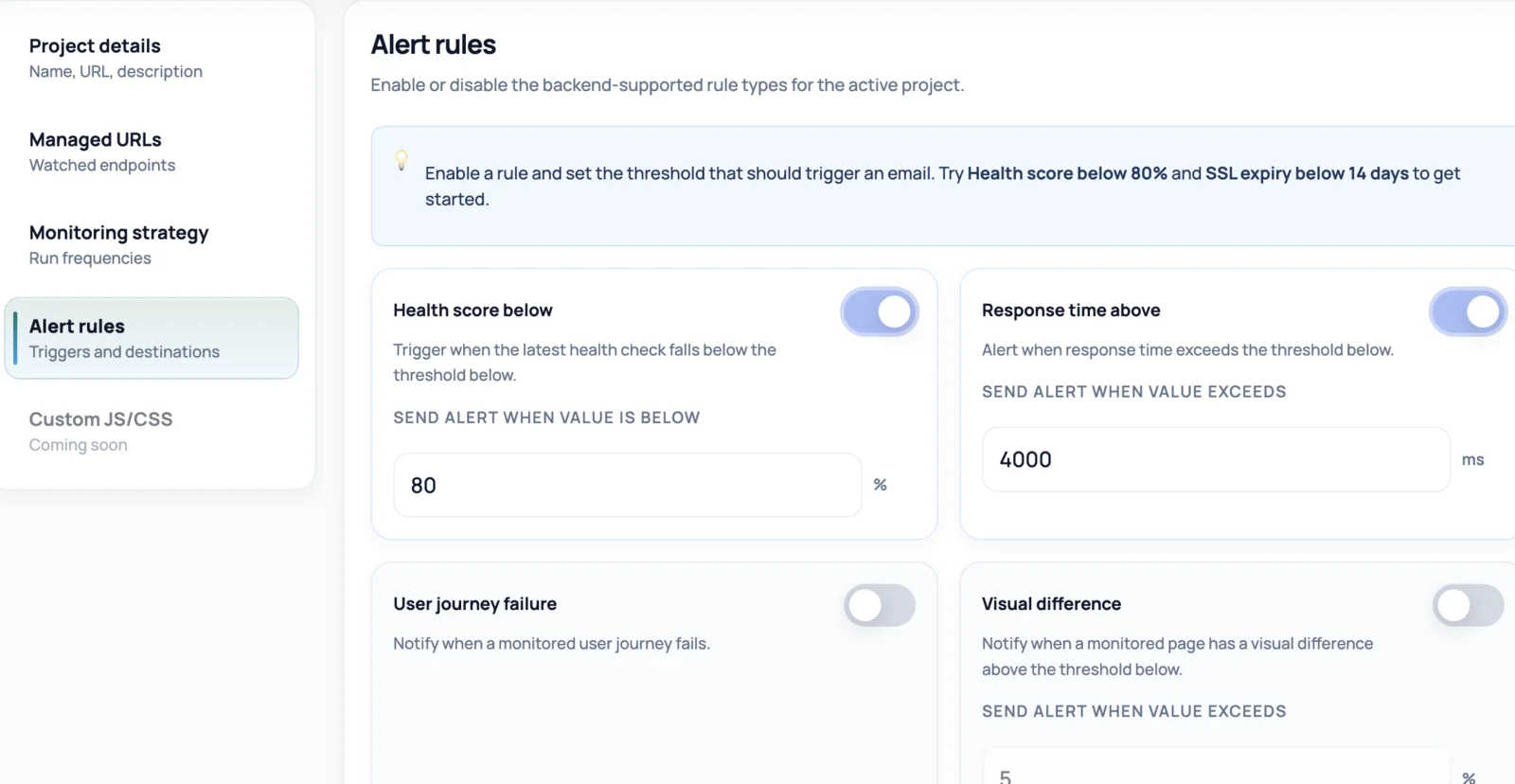
NorthDuty turns health-check results into configurable alert thresholds so teams can decide when a signal is important enough to notify.
Set thresholds for website health and related monitoring signals, including low health score, slow response time, SSL expiry, and failed user journeys.
Most uptime tools tell you whether the server replied. NorthDuty tells you that, plus whether the SSL certificate is valid, the DNS resolved correctly, the page actually rendered content, the scripts and stylesheets loaded, the front-end ran without errors, and the APIs the page depends on returned successfully.
It runs every 5 minutes by default and is configurable per project, with 1, 5, and 15 minute schedules supported. Every check also scores security headers, audits accessibility against WCAG guidelines, checks SEO fundamentals, and flags domain expiry — giving you a composite health score across seven dimensions in a single pass.
Uptime monitoring that only checks status codes misses most of the failures customers actually run into.
Add a URL, get a check every 5 minutes by default. Adjust the cadence anytime in settings.
Create a project with your site's base URL. Uptime monitoring is enabled by default — no config required.
Each check executes from a real browser context and records HTTP, SSL, DNS, page-render, resource, JavaScript, and API signals together.
Change the frequency in project settings without touching code or losing history.
Every run is timestamped with full context, so when something fails you know what changed and where to look first.
Explore pricing, feature details, solution pages, and related tools connected to this website monitoring use case.
Pricing
NorthDuty plans are sized by how many checkout, signup and login journeys you monitor: Free, $29 Starter, $79 Pro, $199 Business. 7-day trial, no card.
Compare pricing plansHub
Explore NorthDuty features: coverage-aware AI journeys, a cross-site workspace overview, website health checks, and connected incident response.
Browse FeaturesHub
Explore NorthDuty solutions for ecommerce website monitoring, SaaS website monitoring, agency website monitoring, and startup website monitoring.
Browse SolutionsFeature
Learn how NorthDuty combines editable user journeys and website health checks in one website monitoring project.
Explore Website MonitoringFeature
Monitor SSL certificates with NorthDuty website health checks so validity, trust, and expiry issues are visible before visitors are blocked.
Explore SSL Certificate MonitoringFeature
Monitor DNS resolution with NorthDuty as part of website health checks, so domain and resolution issues are visible before important pages become unreachable.
Explore DNS MonitoringFeature
Monitor website performance signals, response timing, and rendering context on the pages and journeys that affect revenue, leads, and trust.
Explore Website Performance MonitoringFeature
NorthDuty runs your checkout, signup, login and form flows in a real browser on a schedule and reports the exact step that failed, with a screenshot.
Explore User Journey MonitoringSolution
Monitor ecommerce checkout, add-to-cart, payment paths, blank pages, and JavaScript errors.
View For EcommerceSolution
Use NorthDuty for SaaS website monitoring to protect signup, login, onboarding, billing, and customer-facing application flows.
View SaaS Website MonitoringAnswers to common questions about this monitoring feature and when teams should use it.
Every 5 minutes by default. The frequency is configurable per project in settings with 1, 5, and 15 minute options.
No. Each check returns HTTP status, SSL, DNS, redirects, response timing, blank-page detection, broken resources, JavaScript errors, API call results, security header scoring, WCAG accessibility violations, SEO fundamentals, and domain expiry — all in a single run.
Yes. NorthDuty analyzes the rendered page for visible text, images, canvas, SVG, video, and styled surfaces, and flags pages that load without visible content.
In NorthDuty there isn't one. Uptime monitoring is a single check that also returns website-health signals (SSL, DNS, broken resources, JavaScript errors, API call results), so you don't need a separate product for it.
Get uptime monitoring that returns HTTP, SSL, DNS, blank pages, broken resources, JavaScript errors, API calls, security headers, accessibility violations, SEO fundamentals, and domain expiry in one check every 5 minutes by default.
7 days with Pro features and limits, no credit card — then keep one daily journey on the free plan.