User Journey Monitoring

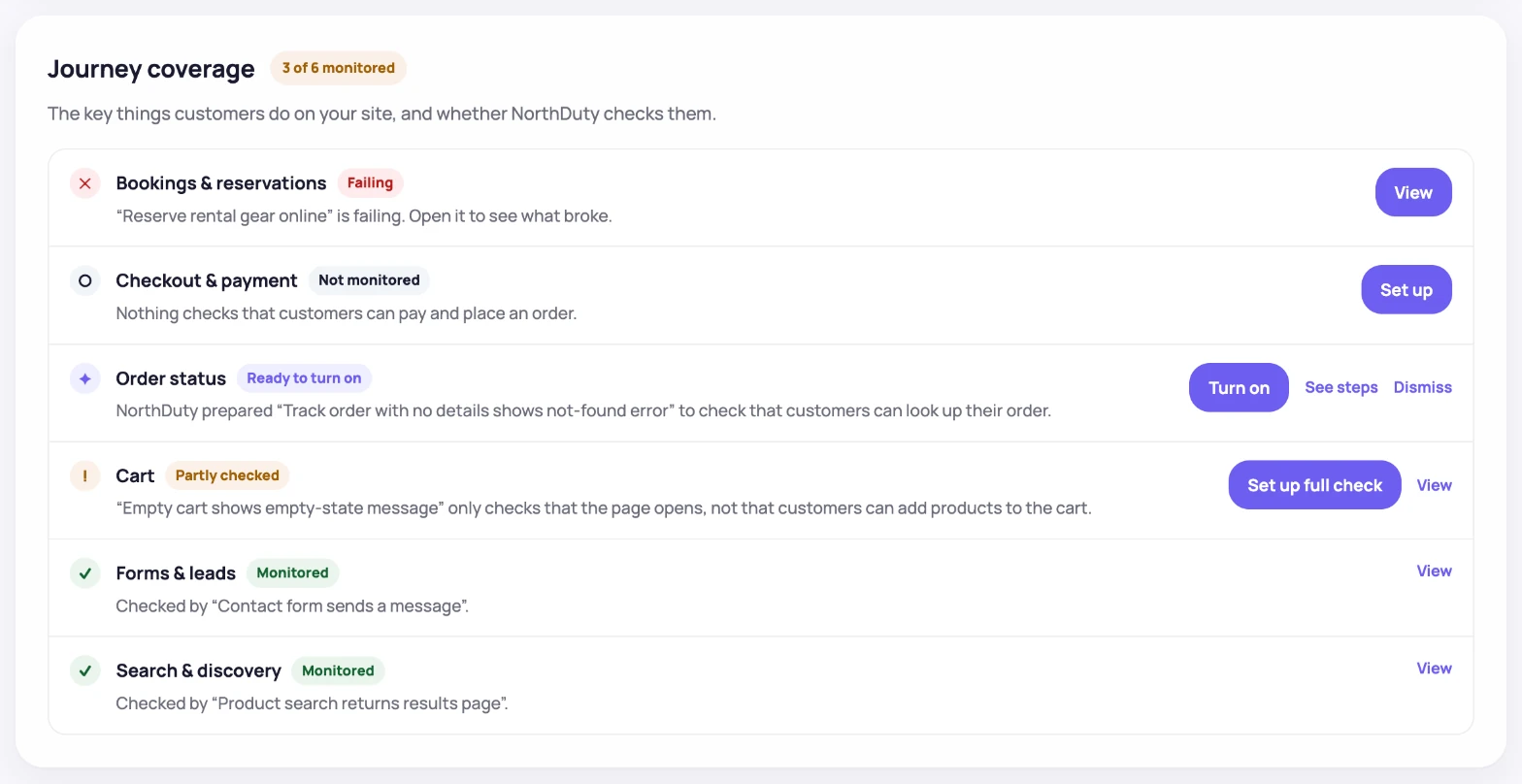
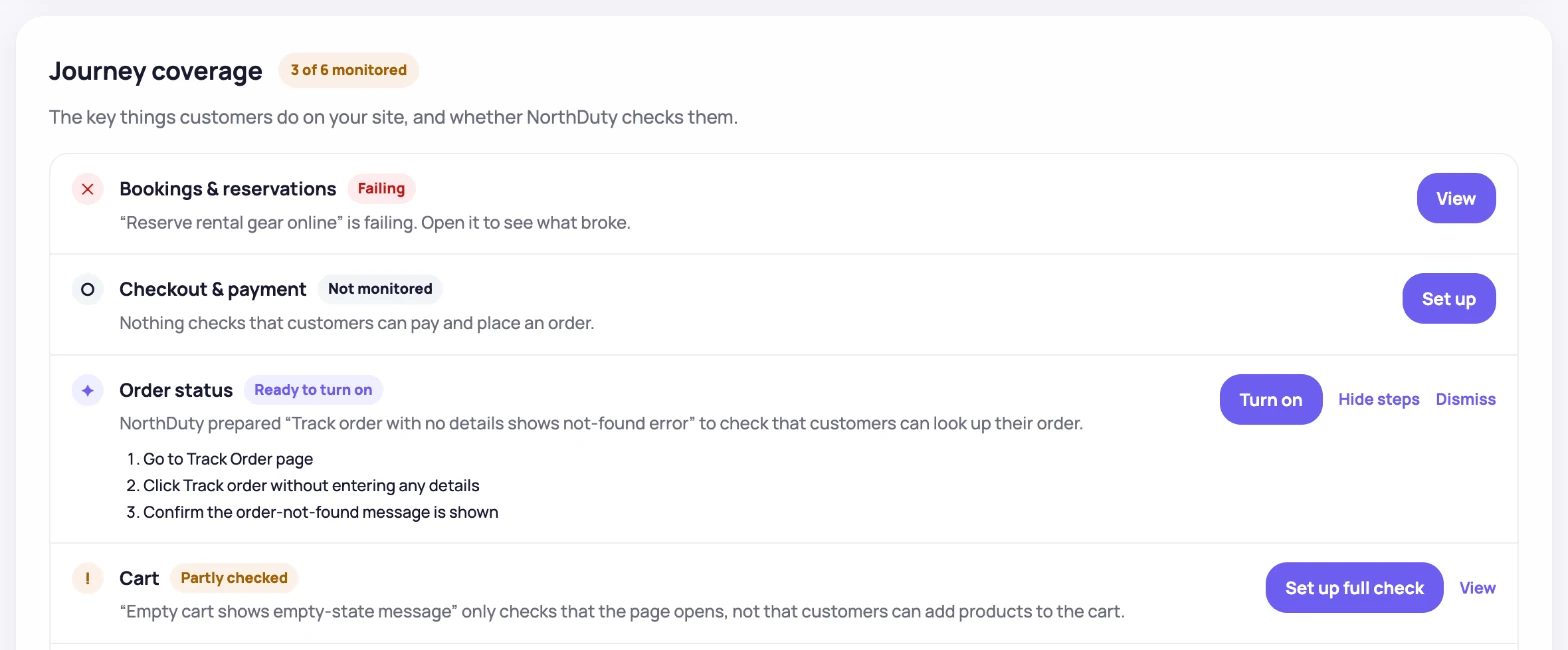
NorthDuty AI suggests 2-5 user journeys for your site as soon as you add a base URL. Enable any in one click, or describe your own flow in plain text. No code, no Playwright scripts.

Watch signup, login, and checkout complete end to end, the way real users do.

Monitor the journeys that drive revenue and retention

A website can look fine on the surface while a critical journey is broken underneath — login flows, checkout steps, signup paths, demo requests, or form submissions that depend on several pages, scripts, and APIs all working together.

NorthDuty user journey monitoring catches those breakages. The AI proposes 2-5 journeys based on your site so you can start with one click, and the plain-text editor lets you describe any custom flow in your own words.

How journeys get set up

Two paths in, both designed for non-technical users.

2-5 AI-suggested journeys

NorthDuty AI analyzes your site and proposes 2-5 user journeys most teams care about. Enable any of them in one click.

Plain-text custom journeys

Need something specific? Describe the journey in plain text — "go to /pricing, click the Annual toggle, click Start Free Trial, fill the form..." — and NorthDuty runs it on a schedule.

Step-by-step failure visibility

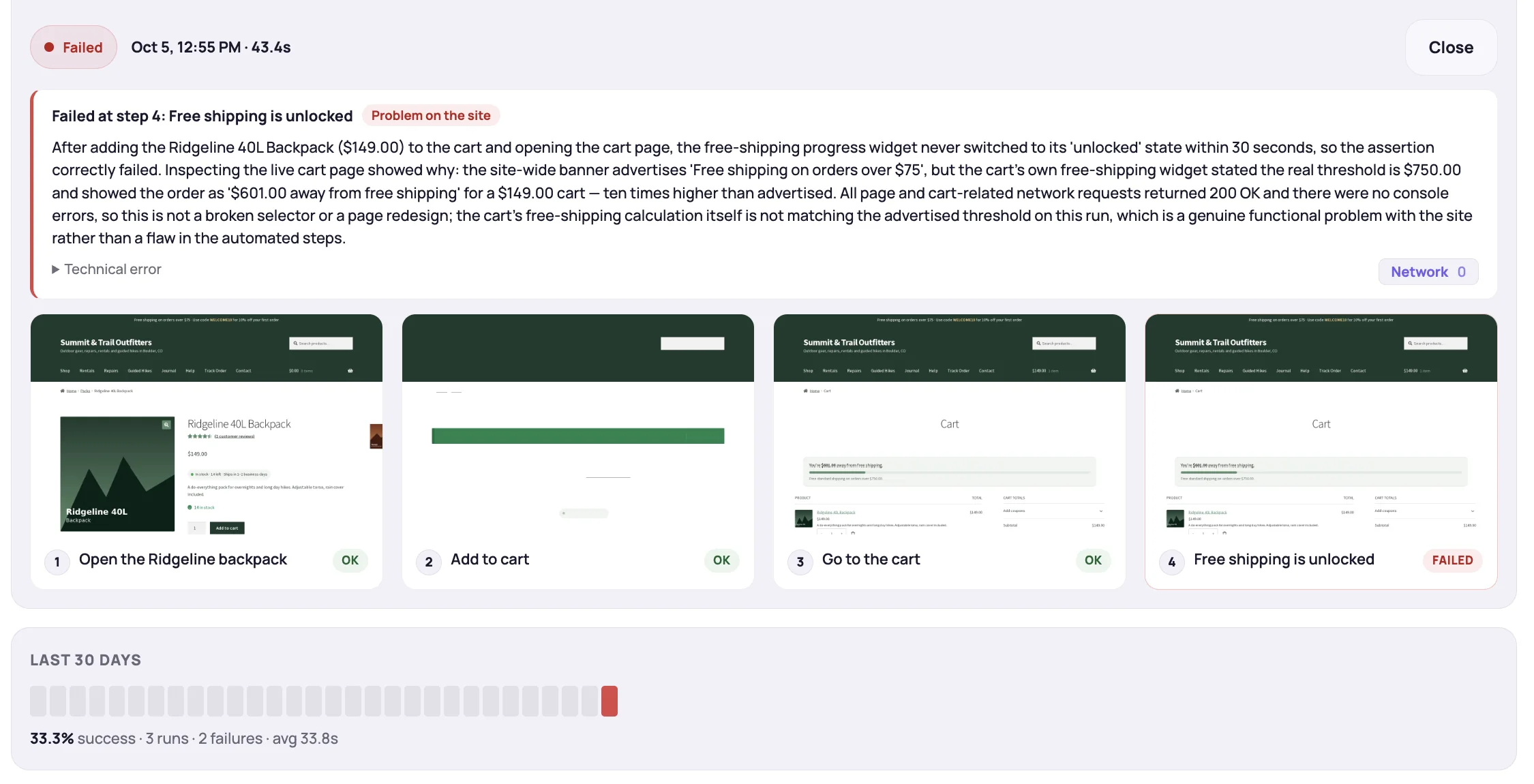
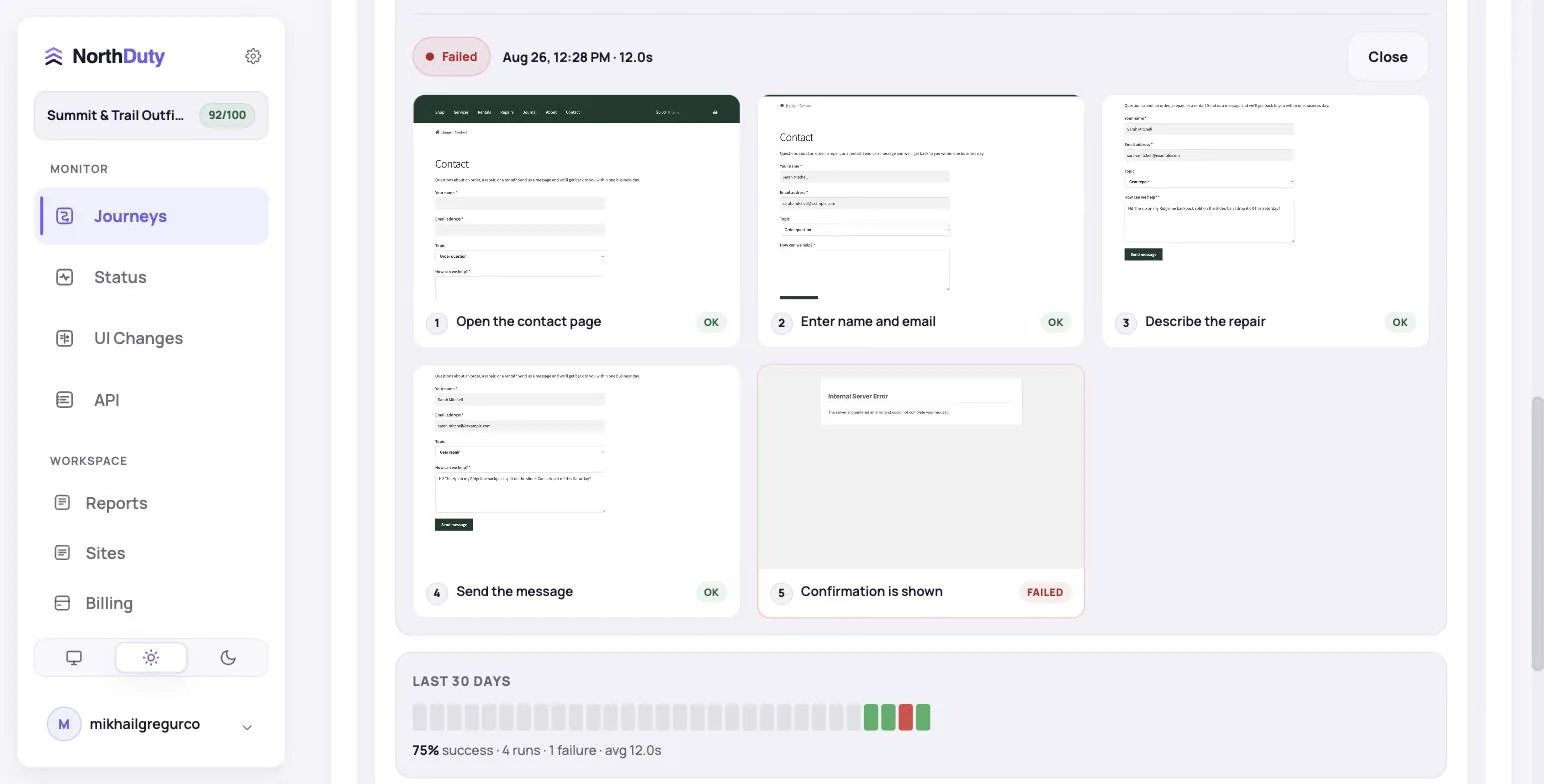
When a journey fails, you see which step broke and what the page looked like — so you can tell whether it was UI, JavaScript, or backend.

Runs on a schedule

Journeys execute on their configured cadence and can also be run on demand, reporting success, failure, and timing in the same dashboard.

Journey monitoring proof, from suggestion to latest run

NorthDuty shows both the setup path and the operational evidence: suggested journeys, step lists, latest run status, and success rate.

AI Journeys

AI-suggested flows with concrete steps

Suggested journeys include the intent, severity, and exact steps before you enable monitoring.

NorthDuty AI suggested flows screen showing ecommerce journey recommendations with steps and enable monitoring buttons.
AI-suggested ecommerce flows with step lists and one-click enable controls.
Journey Results

Healthy run details with step timeline

The journey detail keeps the current status, monitored start URL, step timeline, latest duration, and success rate in one view.

NorthDuty user journey monitoring detail screen showing step timeline, last runs, success rate, and step screenshots for a monitored journey.
Journey detail with step timeline, run history, step screenshots, latest duration, and success rate.

Why journey monitoring matters

Critical business journeys are where revenue and trust are won or lost.

How user journey monitoring works

From base URL to running journeys in a few clicks.

1

Add your base URL

Create a project with your site's URL. NorthDuty AI starts analyzing the site for journey candidates.

2

Review 2-5 AI-suggested journeys

Look through the journeys NorthDuty proposes — login, checkout, signup, demo request, and similar — and enable the ones you care about.

3

Or describe your own in plain text

For a custom flow, write the steps the way you'd explain them to a teammate. NorthDuty runs them as-is.

4

Get alerts when a step breaks

When a journey fails, the report shows where it stopped, what the page looked like at the time, and the error context.

Related NorthDuty Pages

Explore pricing, feature details, solution pages, and related tools connected to this website monitoring use case.

Pricing

Pricing

NorthDuty pricing for website monitoring: Free, $29 Starter, $79 Pro, $199 Business, and $499 Enterprise plans.

Compare pricing plans

Hub

Features

Explore NorthDuty features: website health checks every 5 minutes, screenshot-based visual change detection, and AI-suggested user journey monitoring in one project.

Browse Features

Hub

Solutions

Explore NorthDuty solutions for ecommerce website monitoring, SaaS website monitoring, agency website monitoring, and startup website monitoring.

Browse Solutions

Feature

Website Monitoring

Learn how NorthDuty combines health checks, screenshot diffs, and editable user journeys in one website monitoring project.

Explore Website Monitoring

Feature

Uptime Monitoring

Monitor uptime every 5 minutes by default with HTTP, SSL, DNS, blank-page detection, broken resources, JavaScript errors, and API call tracking.

Explore Uptime Monitoring

Feature

Visual Regression Monitoring

Screenshot-based visual regression testing and website change detection for key pages — get pixel diffs on design, content, and layout changes, no code required.

Explore Visual Regression Monitoring

Feature

Signup Flow Monitoring

Monitor signup flows with NorthDuty user journeys so broken forms, missing CTAs, JavaScript errors, API failures, and onboarding issues are caught early.

Explore Signup Flow Monitoring

Feature

Login Monitoring

Monitor login flows with NorthDuty user journeys so authentication pages, forms, JavaScript, APIs, and account-access steps keep working.

Explore Login Monitoring

Feature

Form Monitoring

Monitor website forms with user journeys and page health checks so broken lead, contact, checkout, and submit flows are caught early.

Explore Form Monitoring

Solution

Ecommerce Website Monitoring

Use NorthDuty for ecommerce website monitoring to protect product pages, cart, checkout, payments, and revenue-critical customer journeys.

View Ecommerce Website Monitoring

Solution

SaaS Website Monitoring

Use NorthDuty for SaaS website monitoring to protect signup, login, onboarding, billing, and customer-facing application flows.

View SaaS Website Monitoring

Frequently Asked Questions

Answers to common questions about this monitoring feature and when teams should use it.

Do I need to write code to set up a journey?

No. NorthDuty AI suggests 2-5 journeys you can enable in one click. For custom flows, describe the steps in plain text.

How does NorthDuty suggest journeys?

Once you add a base URL, the AI analyzes your site and proposes 2-5 journeys most relevant to the type of site it sees — login, checkout, signup, demo request, and similar paths.

How often do journeys run?

Journey cadence is configurable per project. Set it as tight or as loose as the flow needs.

What does NorthDuty show when a journey fails?

You see which step stopped, the page state at that moment, and the error context — enough to know whether the failure came from UI, JavaScript, or a backend service.

Call To Action

Start monitoring your website with NorthDuty today.

Enable any of 2-5 AI-suggested user journeys in one click, or describe your own flow in plain text — and let NorthDuty alert you when a step breaks.

Start on the free plan — add your base URL and monitoring starts in minutes.