Form visibility
A journey that opens the page and fills the form fails the moment a field, embed, or submit button disappears — with a screenshot of the step.
Checkout form monitoring answers the question an uptime check cannot: did the submission actually go through? A form can fail silently for days — the page loads, the button does nothing, and the orders or leads never arrive. NorthDuty monitors checkout forms, lead and demo forms, and landing page forms by exercising them in a real browser on a schedule — and alerts you within minutes when a flow breaks.
Start your 7-day trial — no credit card, free plan after.
Checkout, lead and contact form monitoring — confirm they still submit, not just that they load.
Monitor both the form page and the form action where business impact is high.
A journey that opens the page and fills the form fails the moment a field, embed, or submit button disappears — with a screenshot of the step.
Use user journeys to check whether a form can move to the expected next state when it is safe to test.
Capture front-end errors and first-party requests that can block submissions while the page stays online.
Monitor the pages where broken forms create immediate business pain: demo, contact, quote, checkout, signup, and support.
NorthDuty replays each form as a real user journey and keeps a screenshot for every step, so a broken submission stands out immediately.
NorthDuty runs your contact and lead forms as a real user journey — open the page, fill the fields, submit — and keeps a step-by-step screenshot timeline so a failed submission is easy to pinpoint.
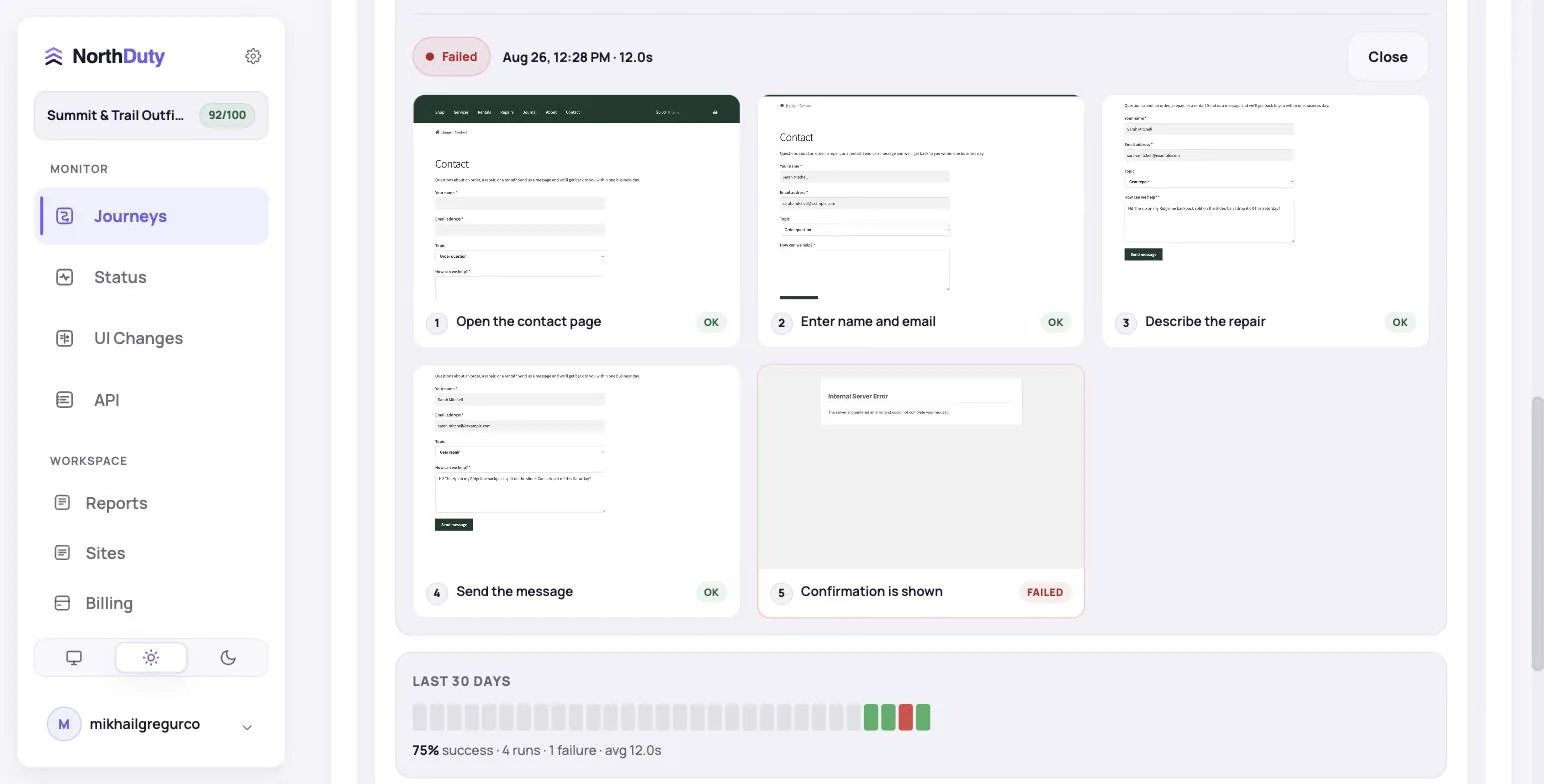
Each monitored form is one journey. Every plan also includes uptime and page-health checks on the form pages. All paid features are open during the 7-day trial, no card required.
| Plan | Price | Forms (journeys) | How often each form is tested | Sites | Alerts |
|---|---|---|---|---|---|
| Free | $0 | 1 | Daily | 1 | |
| Starter | $29/mo | 6 | Every 15 minutes | 2 | Email, Slack, SMS and more |
| Pro | $79/mo | 15 | Every 15 minutes | 5 | Email, Slack, SMS and more |
| Business | $199/mo | 45 | Every 10 minutes | 15 | Email, Slack, SMS and more |
| Enterprise | $499/mo | 150 | Every 5 minutes | 50 | Email, Slack, SMS and more |
A journey drives the form in a real browser, so it works the same whatever built the form.
Fill the fields, submit, and expect the plugin's success message. Catches the AJAX submit that silently fails after a plugin or theme update.
Landing pages rebuilt for a campaign are where forms lose a field or a handler. A daily or 15-minute journey confirms the thank-you step still appears.
Billing, shipping and payment fields are the most plugin-dependent form on a store. Run checkout to the confirmation page with test payment details.
Third-party embeds fail when their script is blocked or a consent tool hides them. The journey sees what a visitor sees, embed included.
A form can be visible while the submit button is dead, validation blocks every user, a JavaScript error interrupts the flow, or the API behind the form returns an error. Basic uptime checks often miss that because the page still loads.
NorthDuty combines user journey monitoring and page health checks so teams can verify that important forms are visible, usable, and able to reach the expected next step.
A broken form can turn qualified visitors into missing leads, failed orders, or support frustration.
Start with the forms tied directly to leads, revenue, support, or account access.
Choose forms tied to demo requests, contact, quotes, checkout, signup, login, bookings, or support.
NorthDuty checks uptime, rendering, blank pages, broken resources, JavaScript errors, and failed API calls.
When possible, describe a test-safe form flow in plain text so NorthDuty can verify the submit path.
When a form journey fails, see whether the issue came from missing UI, JavaScript, API calls, or the next page.
Explore pricing, feature details, solution pages, and related tools connected to this website monitoring use case.
Pricing
NorthDuty plans are sized by how many checkout, signup and login journeys you monitor: Free, $29 Starter, $79 Pro, $199 Business. 7-day trial, no card.
Compare pricing plansHub
Explore NorthDuty features: coverage-aware AI journeys, a cross-site workspace overview, website health checks, and connected incident response.
Browse FeaturesHub
Explore NorthDuty solutions for ecommerce website monitoring, SaaS website monitoring, agency website monitoring, and startup website monitoring.
Browse SolutionsFeature
NorthDuty runs your checkout, signup, login and form flows in a real browser on a schedule and reports the exact step that failed, with a screenshot.
Explore User Journey MonitoringFeature
Monitor signup flows with NorthDuty user journeys so broken forms, missing CTAs, JavaScript errors, API failures, and onboarding issues are caught early.
Explore Signup Flow MonitoringFeature
Monitor login flows with NorthDuty user journeys so authentication pages, forms, JavaScript, APIs, and account-access steps keep working.
Explore Login MonitoringSolution
Monitor client sites for broken checkouts and forms, blank pages, post-launch issues, and client-ready reports.
View For AgenciesFeature
WooCommerce monitoring that runs your real checkout in a browser on a schedule: catch broken carts, failed payment steps and plugin-update fallout early.
Explore WooCommerce MonitoringArticle
Your landing page form says thank you, but the lead never reaches your inbox or CRM. The common causes, how to detect each, and how to monitor lead forms.
Read Lead Form Failure MonitoringArticle
How to monitor website forms end to end — contact, lead, quote and checkout — so a failed submit, broken validation or missing field is caught in minutes.
Read How to Monitor Website FormsArticle
Landing page monitoring that tests the conversion path itself — form submits and CTA links — so paid traffic never lands on a page that cannot convert.
Read How to Monitor a Landing PageAnswers to common questions about this monitoring feature and when teams should use it.
NorthDuty's Free plan tests 1 form daily. Starter is $29/month for 6 forms tested every 15 minutes, Pro is $79/month for 15 forms every 15 minutes, Business ($199) covers 45 forms every 10 minutes and Enterprise ($499) 150 forms every 5 minutes. Each form is one journey, and uptime checks on the form pages are included.
Yes. Journeys fill and submit the form in a real browser and check for the success message, so any WordPress form plugin, page-builder form, or embedded form (HubSpot, Typeform) can be monitored.
CAPTCHAs are designed to stop automated submissions, including monitoring. Use the provider's test keys on a monitoring copy of the form, or allow-list NorthDuty's published monitoring IP addresses in your firewall or bot-protection rules.
Form monitoring checks whether important website forms are visible, usable, and able to reach the expected next step or submission result.
Start with demo requests, contact sales, quote forms, booking forms, checkout forms, signup forms, login forms, and support forms.
NorthDuty can monitor form journeys when the flow is safe to test, and it can also monitor form pages for availability, JavaScript errors, and failed API calls.
Checkout form monitoring runs your checkout form in a real browser on a schedule — filling fields, submitting, and verifying the expected next step — so a payment or address form that stops submitting is caught within minutes instead of showing up as lost orders.
NorthDuty submits a test-safe version of your lead form on a schedule and verifies the confirmation step. If the submission fails — a dead button, a JavaScript error, or a failing API — you get an alert by email, Slack, Teams, webhook, or SMS within minutes.
Yes. Landing page forms are a common silent failure point because campaigns change often. NorthDuty checks that the form renders, that its scripts and API calls work, and that a safe test submission reaches the expected thank-you step.
Use NorthDuty to monitor important website forms and catch missing fields, dead submit buttons, JavaScript errors, API failures, and broken next steps.
7 days with Pro features and limits, no credit card — then keep one daily journey on the free plan.