Website Monitoring That Catches What Uptime Misses

Uptime says the server responded. NorthDuty shows whether the page rendered, key UI stayed intact, and signup, checkout, login, or form journeys still work.

Built forEcommerceSaaS platformsAgenciesStartups

Start on the free plan — add your base URL and monitoring starts in minutes.

Trust starts with inspectable evidence

NorthDuty keeps the checks, screenshots, diffs, journey steps, and alert rules behind each monitoring result.

Health checksVisual diffsJourney historyAlert rules

Use the evidence before changing a release, opening an incident, or notifying customers.

3 layers

Health, visual, and journey coverage

2-5

AI-suggested journeys to review

No code

Plain-text journeys without scripts

Continuously verify the quality of every release

Websites change constantly through deployments, content updates, third-party services, and infrastructure changes. NorthDuty checks the resulting customer experience on a schedule.

Quality evidence from real monitoring screens

NorthDuty keeps the evidence behind every quality check: alert thresholds, AI-suggested journeys, visual diffs, and step-level journey results.

Alert Rules

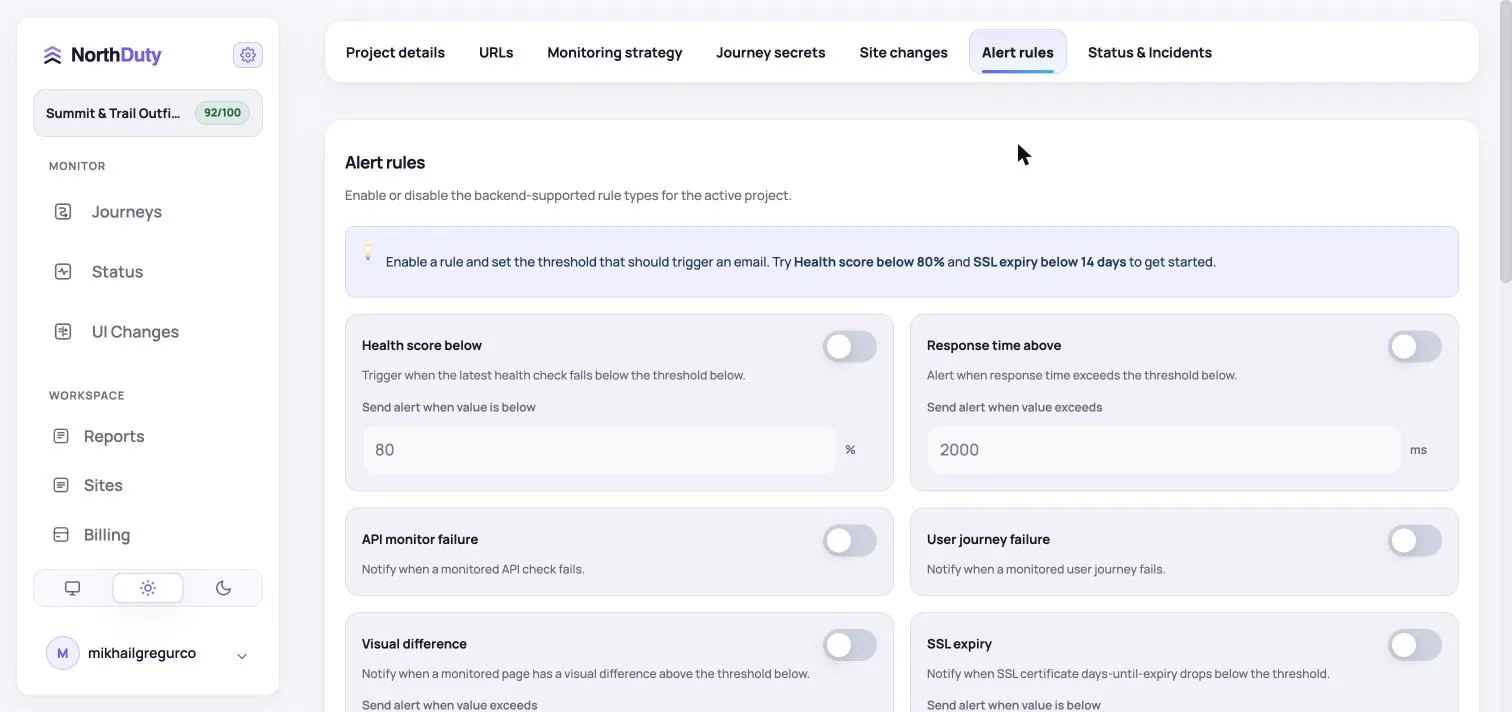
Turn website health signals into alert thresholds

Configure alerts for health score, response time, failed journeys, visual differences, SSL expiry, and other website reliability signals.

NorthDuty alert rules screen showing health score, response time, user journey failure, visual difference, and SSL expiry thresholds.
Alert thresholds for health score, response time, journey failures, visual differences, and SSL expiry.
AI Journeys

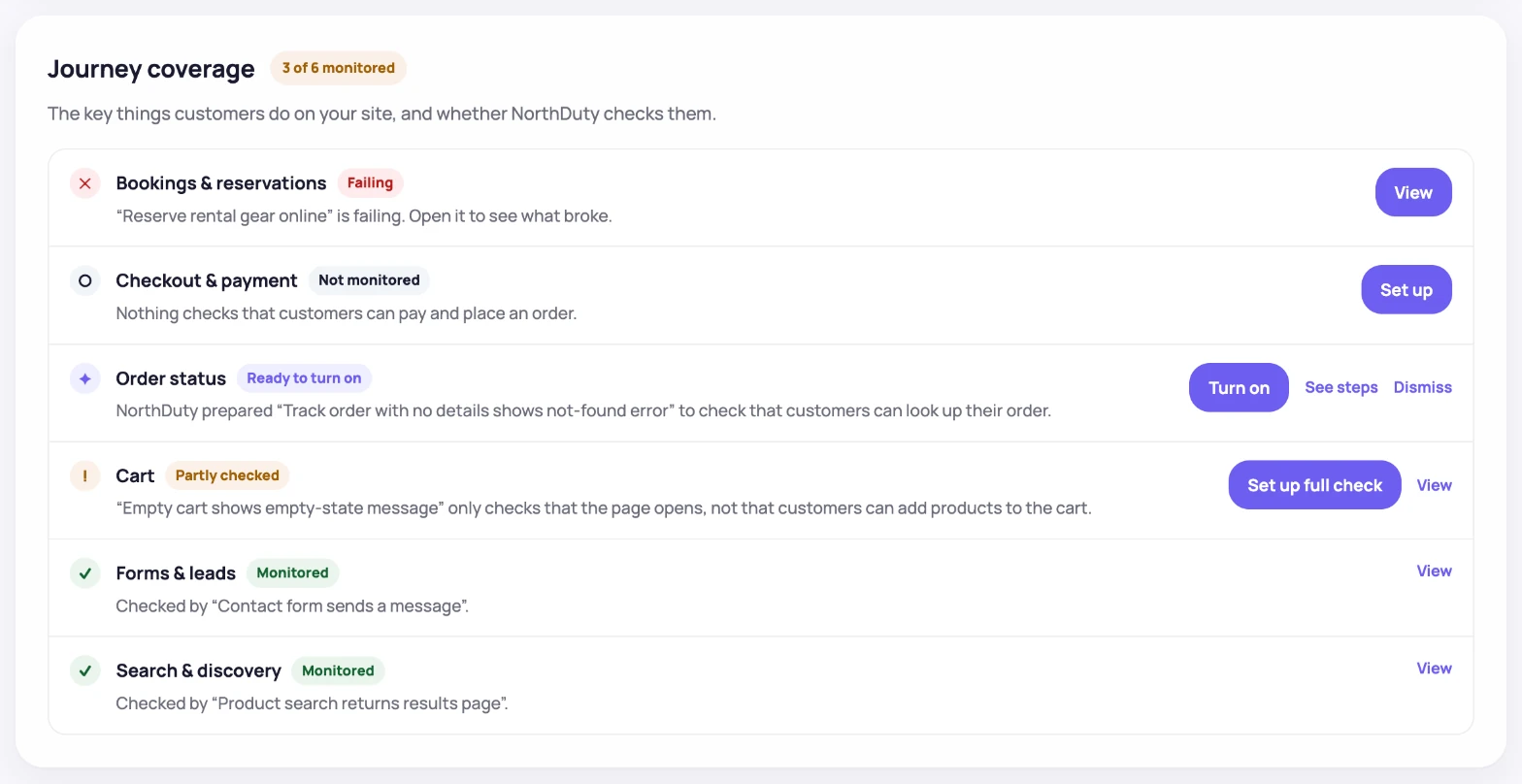
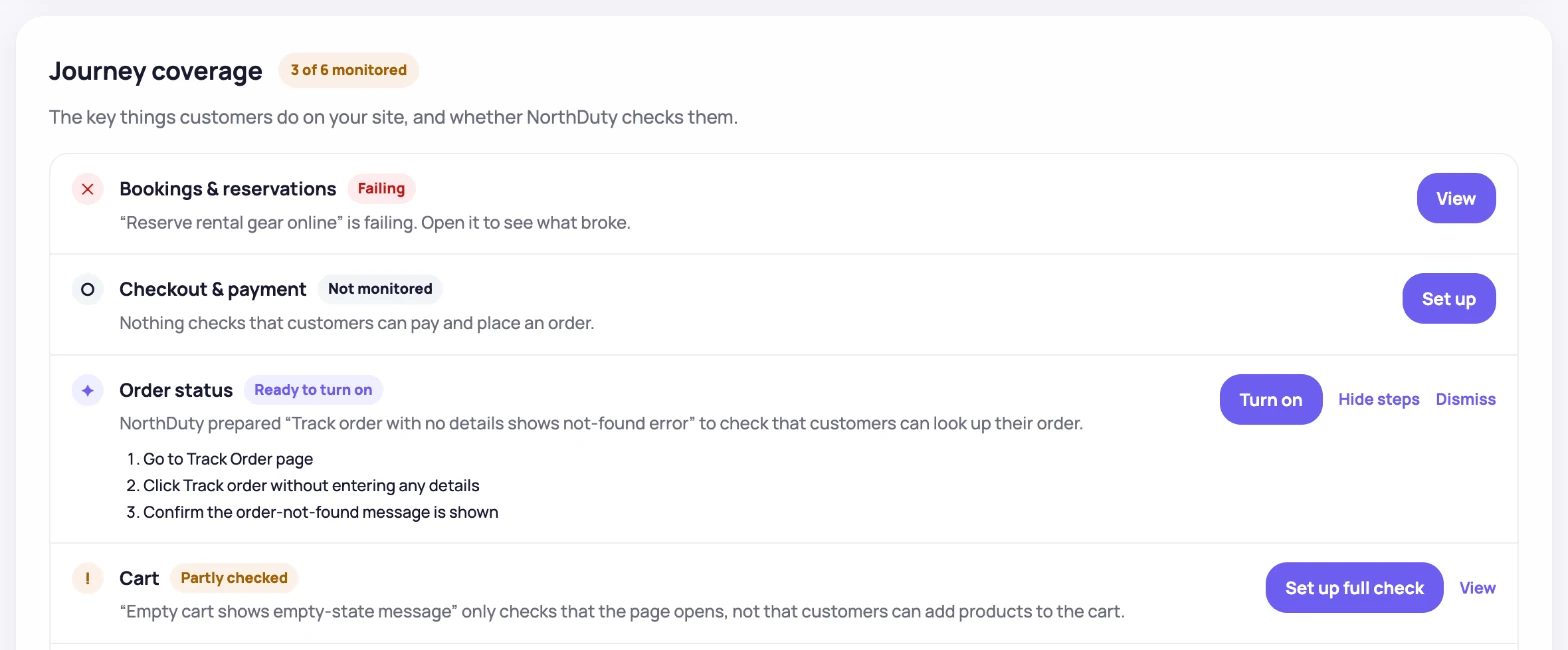
Start with AI-suggested journeys, then enable the ones that matter

NorthDuty suggests site-specific happy-path flows with concrete steps, so teams can start monitoring important user actions without writing scripts.

NorthDuty AI suggested flows screen showing ecommerce journey recommendations with steps and enable monitoring buttons.
AI-suggested ecommerce flows with step lists and one-click enable controls.
UI Changes

Review visual diffs instead of guessing what changed

NorthDuty compares the latest screenshot against the previous baseline and reports the changed percentage with side-by-side evidence.

NorthDuty UI changes monitoring screen showing screenshot history, previous screenshot, diff overlay, and 8.40 percent changed.
Screenshot history with previous capture, diff overlay, and changed percentage.
Journey Results

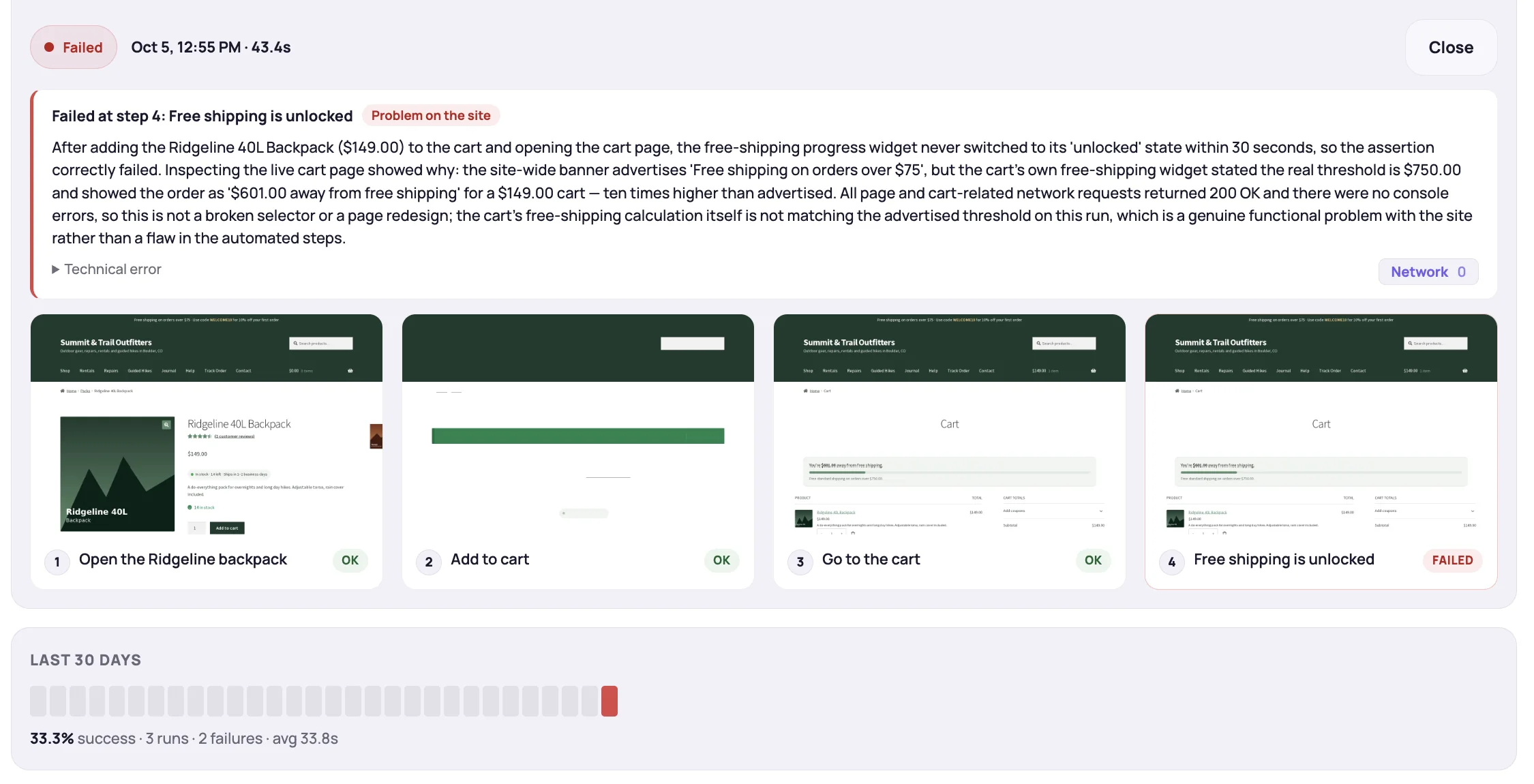
Confirm journey health with run history

A journey result shows the exact monitored steps, latest run timing, success rate, and current status for a customer-facing flow.

NorthDuty user journey monitoring detail screen showing step timeline, last runs, success rate, and step screenshots for a monitored journey.
Journey detail with step timeline, run history, step screenshots, latest duration, and success rate.

One continuous QA system for your website

Automated website health checks, visual regression monitoring, and user journey testing run together for every project.

How continuous website QA works

Set up a project once, then let NorthDuty verify website quality on a schedule.

1

Create a project with your base URL

Add your website's base URL and NorthDuty creates a quality monitoring project around it. Website health checks start immediately.

2

Quality checks run continuously

Website health runs every 5 minutes by default, screenshots and visual diffs can run daily or weekly, and user journeys use the cadence you choose.

3

Review evidence and act on regressions

Each run is timestamped in the dashboard with health details, diff images, journey transcripts, alerts, and reports that help your team respond.

Use cases

NorthDuty adapts to the business problems different teams need to protect, from checkout reliability to multi-site oversight.

Start free, then expand coverage

Choose the monitoring depth that matches the risk on your website. The full pricing page compares limits, cadence, page stability monitoring, and user-flow capacity.

Frequently Asked Questions

Answers to common questions about NorthDuty and website monitoring.

How is this different from UptimeRobot or Pingdom?

Use a traditional uptime tool if you mainly need to know whether an endpoint responds. NorthDuty is focused on website quality evidence in one project: real-browser health checks, screenshot-based visual diffs, and user journeys you can enable or describe without writing scripts. It is not trying to replace a full observability or APM platform.

Do I need to write Playwright scripts?

No. NorthDuty uses Playwright and Chromium behind the scenes, but setup is product-driven. It suggests 2-5 journeys for a project, lets you enable a suggested journey, and also supports custom journeys described in plain text.

What does the free plan include?

The Free plan includes 20 monitored pages, website health monitoring only, checks every 15 minutes, and basic email notification. Page stability monitoring and API monitoring start on Starter, and user-flow monitoring starts on Pro.

Is monitoring safe for authorized URLs?

NorthDuty is intended for websites, URLs, pages, flows, accounts, and services you own, operate, administer, or are otherwise authorized to test. For authenticated or transactional journeys, use test-safe accounts and inputs, and avoid placing unnecessary secrets, payment data, protected health information, or highly sensitive data in URLs, journey steps, reports, or alerts.

How fast can I set it up?

You can create a project with a base URL and start website health monitoring in minutes. Screenshot schedules and user journeys take additional configuration, but NorthDuty can suggest 2-5 journeys for a new project so you are not starting from a blank script.

Explore website monitoring resources

Go deeper into product pages, comparison pages, and practical guides for monitoring the parts of a website that affect revenue, leads, and customer trust.

Feature

Website Monitoring

Learn how NorthDuty combines health checks, screenshot diffs, and editable user journeys in one website monitoring project.

Explore Website Monitoring

Feature

Uptime Monitoring

Monitor uptime every 5 minutes by default with HTTP, SSL, DNS, blank-page detection, broken resources, JavaScript errors, and API call tracking.

Explore Uptime Monitoring

Feature

Visual Regression Monitoring

Screenshot-based visual regression testing and website change detection for key pages — get pixel diffs on design, content, and layout changes, no code required.

Explore Visual Regression Monitoring

Feature

User Journey Monitoring

NorthDuty AI suggests 2-5 website journeys. Enable them in one click or describe a custom multi-step flow in plain text.

Explore User Journey Monitoring

Feature

Alerting

Send NorthDuty alerts to email, Slack, Teams, Discord, Google Chat, webhooks, Telegram, WhatsApp, and SMS.

Explore Alerting

Feature

Status Pages

Publish a public status page, track incidents automatically from alert rules, and schedule maintenance windows — all from NorthDuty project settings.

Explore Status Pages

Hub

Features

Explore NorthDuty features: website health checks every 5 minutes, screenshot-based visual change detection, and AI-suggested user journey monitoring in one project.

Browse Features

Pricing

Pricing

NorthDuty pricing for website monitoring: Free, $29 Starter, $79 Pro, $199 Business, and $499 Enterprise plans.

Compare pricing plans

Hub

Solutions

Explore NorthDuty solutions for ecommerce website monitoring, SaaS website monitoring, agency website monitoring, and startup website monitoring.

Browse Solutions

Article

How to Monitor Website Uptime

Learn how to monitor website uptime, choose the right checks, and catch downtime before it hurts traffic, leads, or sales.

Read How to Monitor Website Uptime

Comparison

UptimeRobot Alternative

Looking for a UptimeRobot alternative? Compare NorthDuty vs UptimeRobot for deeper website health monitoring and user journey visibility.

Compare UptimeRobot

Comparison

Pingdom Alternative

Looking for a Pingdom alternative? Compare NorthDuty vs Pingdom for website health monitoring and business-critical page monitoring.

Compare Pingdom

Comparison

Datadog Alternative

Looking for a Datadog alternative? Compare NorthDuty vs Datadog for focused website health monitoring and simpler website reliability workflows.

Compare Datadog

Comparison

Checkly Alternative

Looking for a Checkly alternative? Compare NorthDuty vs Checkly for business-friendly website health monitoring and customer-journey visibility.

Compare Checkly
Call To Action

Start monitoring your website with NorthDuty today.

Use NorthDuty to continuously verify website health, visual consistency, and critical user journeys from one project.

Start on the free plan — add your base URL and monitoring starts in minutes.

Get Started Free