A plugin update breaks a page
An auto-updated plugin conflicts with the theme or another plugin and blanks a template — the server still responds, but the page is empty.
WordPress powers a huge share of the web, and its plugin-and-theme flexibility is exactly what makes it fragile. Monitoring a WordPress site means watching for the update, plugin, and theme changes that break pages while the server still looks perfectly healthy.
Start your 7-day trial — no credit card, free plan after.
Catch the plugin, theme, and update breakages that blank WordPress pages while the server looks fine.
A WordPress site is a moving target. Core updates, plugin updates, theme changes, and new content all ship on their own schedules, and any one of them can break the front end while the server keeps returning a healthy 200 response. A plugin conflict can blank a page, a theme update can shift the layout, and a caching change can serve a broken version to visitors — none of which a simple uptime ping will notice.
The risk is higher for agencies and freelancers who manage many WordPress sites at once. An auto-update on a single plugin can take down a contact form, a checkout, or an entire page template, and you often find out from the client rather than from your tools. The gap between the breakage and the phone call is where trust is lost.
WordPress also depends on a stack of things outside the CMS itself: an SSL certificate that has to be renewed, DNS that has to resolve, and third-party scripts that can fail silently. Any of these can degrade the visitor experience without the dashboard showing a single error.
Effective WordPress monitoring goes past 'is the site up' and asks 'do the pages and journeys visitors depend on still work'. That means checking rendered pages, not just HTTP status, and re-checking after every update rather than only when something is reported broken.
NorthDuty runs a full health check that renders each page in a real browser, so it catches blank pages, missing elements, JavaScript errors, broken resources, and failed API calls that a status ping cannot see. It also tracks SSL certificate expiry and DNS resolution as part of the same check, covering the parts of the stack outside WordPress itself.
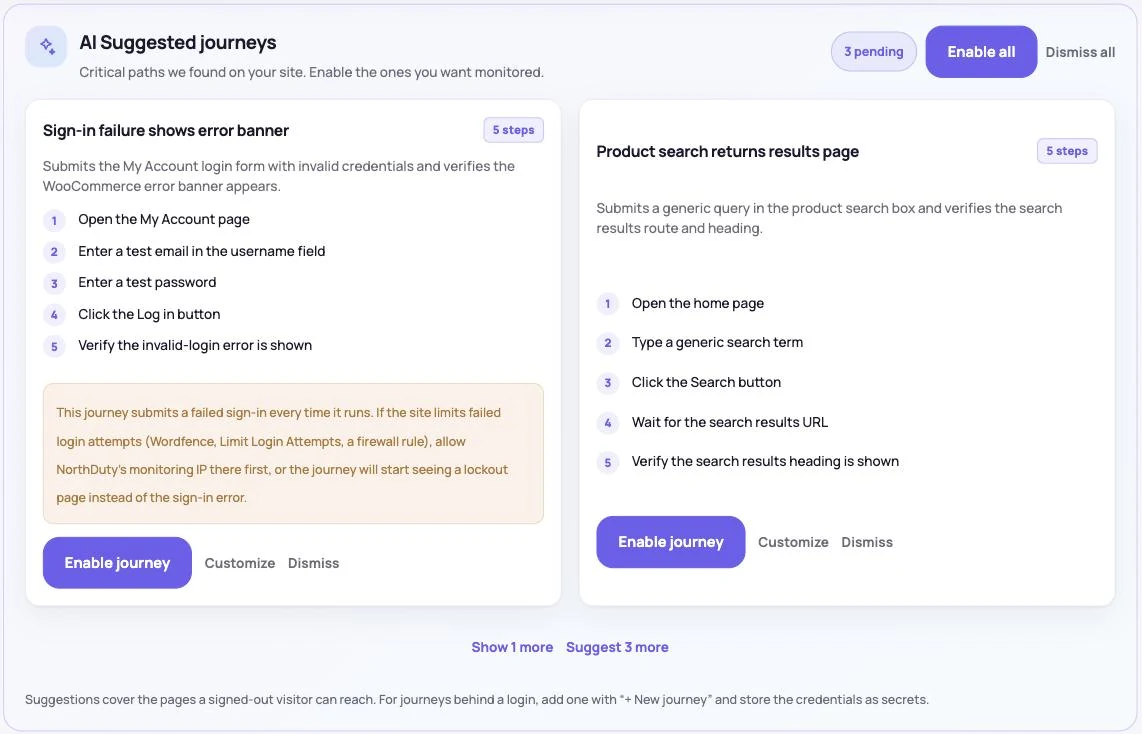
For the flows that matter — a contact form, a WooCommerce checkout, a login — you can add a user journey in plain text and NorthDuty runs it on a schedule, confirming the whole path still completes. With the NorthDuty Connect plugin, a theme or plugin update triggers a re-check, so an update that breaks a page or a flow is flagged right away.
For anyone managing several sites, all of this rolls up with alerting to email, Slack, and more, so a plugin update that breaks one client's site surfaces immediately rather than at the next manual check.
These are the WordPress-specific failures continuous monitoring is designed to surface early.
An auto-updated plugin conflicts with the theme or another plugin and blanks a template — the server still responds, but the page is empty.
A theme update moves or hides a button, breaks the header, or overlaps content. A journey that clicks that button fails at that step, with a screenshot, even when nothing errors.
A form plugin or payment integration silently fails, so leads and orders quietly stop arriving until someone notices the drop.
A certificate expires or a DNS record changes after a migration, making the site look broken or unreachable to visitors.
A few habits keep WordPress updates from turning into silent outages.
Updates are the single biggest source of WordPress breakage, and the checks below are the ones that catch what an uptime ping cannot.
| Check | Why after an update | How long it takes |
|---|---|---|
| Homepage and top landing pages render | Theme and builder updates change markup | Seconds, if a rendered check runs automatically |
| Contact and quote forms submit | Form plugins and their mail delivery break quietly | One test submission per form |
| Checkout completes (WooCommerce) | Payment gateways and checkout blocks are the most fragile pieces | One journey run |
| Login works | Security plugins and caching change auth behaviour for guests | One journey run |
| No new JavaScript errors | A conflicting script kills click handlers while the page still loads | Automatic during a rendered check |
| robots.txt and sitemap unchanged | SEO plugin updates rewrite both | One request each |
| SSL and DNS still valid | Migrations and host changes touch these | Automatic |
For a single site, the job is straightforward: uptime on the site, a journey on each flow that matters, rendered health checks on the pages you would be embarrassed to break, and alerts that reach you rather than an inbox nobody reads.
For an agency the constraints are different. Fifty sites means alert noise is the enemy, so confirmation before alerting and sensible thresholds matter more than check frequency. It also means the monitoring has to produce something a client can see — which is where a monthly report and a public status page stop being nice-to-haves and start being what the retainer is for.
WordPress gives you enormous flexibility, and every bit of that flexibility is a way for the front end to break while the server stays healthy. Uptime alone will not tell you that a plugin update blanked a page or that a form stopped submitting.
NorthDuty monitors WordPress the way visitors actually experience it — rendered pages, real journeys, SSL, and DNS — so you (and your clients) find out about a broken update from your monitoring, not from a customer.
Keep exploring the feature pages and commercial routes connected to this topic.
Feature
WordPress monitoring for client rosters: real-browser journey checks and uptime that catch what plugin and theme updates break.
Explore WordPress MonitoringFeature
WooCommerce monitoring that runs your real checkout in a browser on a schedule: catch broken carts, failed payment steps and plugin-update fallout early.
Explore WooCommerce MonitoringFeature
NorthDuty runs your checkout, signup, login and form flows in a real browser on a schedule and reports the exact step that failed, with a screenshot.
Explore User Journey MonitoringSolution
Monitor client sites for broken checkouts and forms, blank pages, post-launch issues, and client-ready reports.
View For AgenciesArticle
Running client websites? Learn how website monitoring for agencies catches broken pages, checkout failures and broken forms before your clients call.
Read Website Monitoring for AgenciesPricing
NorthDuty plans are sized by how many checkout, signup and login journeys you monitor: Free, $29 Starter, $79 Pro, $199 Business. 7-day trial, no card.
Compare pricing plansMore NorthDuty guides on related website monitoring topics.
Article
A free WordPress maintenance report template for agencies — the eight sections clients actually read, example wording for each, and what to automate.
Read WordPress Maintenance Report TemplateArticle
What belongs in a WordPress care plan at each tier, what agencies charge in 2026, and how to price yours from your own costs instead of guessing.
Read WordPress Care Plan PricingArticle
Learn how to monitor WordPress after a plugin update: why updates silently break WooCommerce checkout without downtime, and how to catch failures first.
Read How to Monitor WordPress After a Plugin UpdateShort answers that summarize the practical takeaways from this guide.
That key pages still render, forms still submit, checkout and login still complete, no new JavaScript errors appeared, and robots.txt and the sitemap were not rewritten by an SEO plugin update. Those are the failures that leave the site returning HTTP 200 while something visitors need is broken.
NorthDuty has a free plan that monitors pages with health checks including SSL, DNS, and blank-page detection. You can add your WordPress site's URL and start monitoring without a credit card.
Yes. Because NorthDuty renders each page in a real browser, it detects blank pages, missing elements, and JavaScript errors that a plugin conflict causes — even when the server still returns a healthy status.
Yes. You can describe the checkout journey in plain text and NorthDuty runs it on a schedule, confirming that the flow completes rather than just that the page loads.
Yes. NorthDuty is built for monitoring multiple sites, with per-site alerting so you know exactly which client's site broke and why.
Monitor your WordPress sites with NorthDuty so plugin updates, theme changes, and broken forms surface in your alerts instead of your clients' inboxes.
7 days with Pro features and limits, no credit card — then keep one daily journey on the free plan.