Simple website uptime monitoring
If the main need is to know whether pages are reachable, a straightforward uptime-first tool may be enough.
The best website monitoring tool depends on what you need to protect. Some tools focus on uptime. Others are built for broader observability. Others go deeper into real browser flows and page health.
Start your 7-day trial — no credit card, free plan after.
How to compare monitoring tools on the features that actually catch outages.
Buyers often search for the best website monitoring tools when they are already feeling pain. The site went down. Checkout broke. Customers reported blank pages. A campaign page stopped converting after a release. The right tool should match that problem, not just offer a long feature list.
The main decision is whether you only need uptime monitoring or whether you need deeper website health monitoring that can detect broken pages, missing UI, failed user journeys, JavaScript problems, and API-related failures.
This comparison reflects common buying patterns and the official positioning of these products. The right choice depends on your team's workflow and how deep you need the monitoring to go.
| Tool | Best for | Strength | What to watch |
|---|---|---|---|
| NorthDuty | Businesses that need website health and journey monitoring | Catches downtime, broken pages, missing UI, failed flows, JavaScript errors, and API issues | Best fit when business-friendly, customer-experience monitoring matters most |
| Pingdom | Teams focused on uptime, synthetic monitoring, and performance visibility | Well-known for website and synthetic monitoring with real user insights | Teams may still want additional focus on business-facing page health and visible UI issues |
| UptimeRobot | Straightforward uptime monitoring and simple alerting | Easy starting point for availability checks and status visibility | Best when the need is simpler and centered on availability first |
| Datadog | Organizations already investing in broader observability | Strong option when synthetic monitoring needs to connect to wider telemetry and operations workflows | May be more than some business teams need if the core need is website-focused monitoring |
| Checkly | Engineering teams using code-centric browser and API checks | Strong fit for teams that want browser checks in an engineering workflow | Business teams may prefer a more direct website health and page monitoring approach |
The best tool changes depending on the kind of website and the level of operational depth you need.
If the main need is to know whether pages are reachable, a straightforward uptime-first tool may be enough.
If the business depends on product pages and checkout working, deeper website health and user journey monitoring usually matters more.
If monitoring must connect tightly with a broader incident, logs, and metrics workflow, a larger observability platform may fit better.
If you need alerts about broken pages, missing UI, failed flows, and customer-facing issues, choose a tool built around website outcomes.
Keep the buying decision tied to real business risk.
Entry pricing as published on each vendor's own pricing page, checked 18 September 2026. Plans change — verify before you buy.
| Tool | Free plan | Entry paid plan | Multi-step journeys included? |
|---|---|---|---|
| UptimeRobot | 50 monitors, 5-minute checks | Solo $12/mo ($144/yr) | No — single-request checks only |
| StatusCake | 10 uptime tests, 5-minute checks | Superior $24.49/mo ($20.41 annual), 100 tests | Not documented on the pricing page |
| Better Stack | 10 monitors, 30-second checks | Responder licence $29/mo annual ($34 monthly) | Playwright checks billed separately, 100 minutes for $1 |
| Site24x7 | Free tier, 50 resources | Web Uptime $9/mo annual ($10 monthly) | Web Perf $36/mo annual includes 8 transaction monitors |
| Pingdom | Trial only | Not published without the calculator | Yes, as "advanced checks" — 1 on the entry tier |
| Checkly | Hobby, 1,000 browser runs | Starter $24/mo, 3,000 runs | Yes — written as Playwright code |
| Uptrends | 30-day trial | Core $42/mo annual ($46 monthly) | Yes, on higher tiers |
| NorthDuty | 1 journey daily, health checks every 5 min | Starter $29/mo, 6 journeys every 15 min | Yes — no code, failing step named |
Almost every tool here will tell you the server stopped answering, and at that job the cheapest option is fine. The differences only start to matter one level up: can it render the page, can it walk through a purchase, and does the alert name the step that failed or just say the check failed.
It is worth being concrete about why that matters. In a September 2026 check of 100 agency-built WooCommerce stores, 5 had a reproducible public Store API or TLS defect and 10 more had dead menu, footer, cart or product links, yet all 15 homepages loaded normally. Four involved Store API errors or data that a homepage uptime check would not assess; the fifth was a certificate mismatch limited to the www hostname. The study did not place orders, so it reports observed technical defects rather than claiming five failed checkouts.
There is no single best website monitoring tool for every team. The right choice depends on whether you need simple uptime monitoring, broader observability, or deeper website health and journey monitoring.
NorthDuty is built for teams that care about what customers actually experience on the site, not just whether a server responded.
Keep exploring the feature pages and commercial routes connected to this topic.
Feature
Monitor uptime every 5 minutes by default with HTTP, SSL, DNS, blank-page detection, broken resources, JavaScript errors, and API call tracking.
Explore Uptime MonitoringFeature
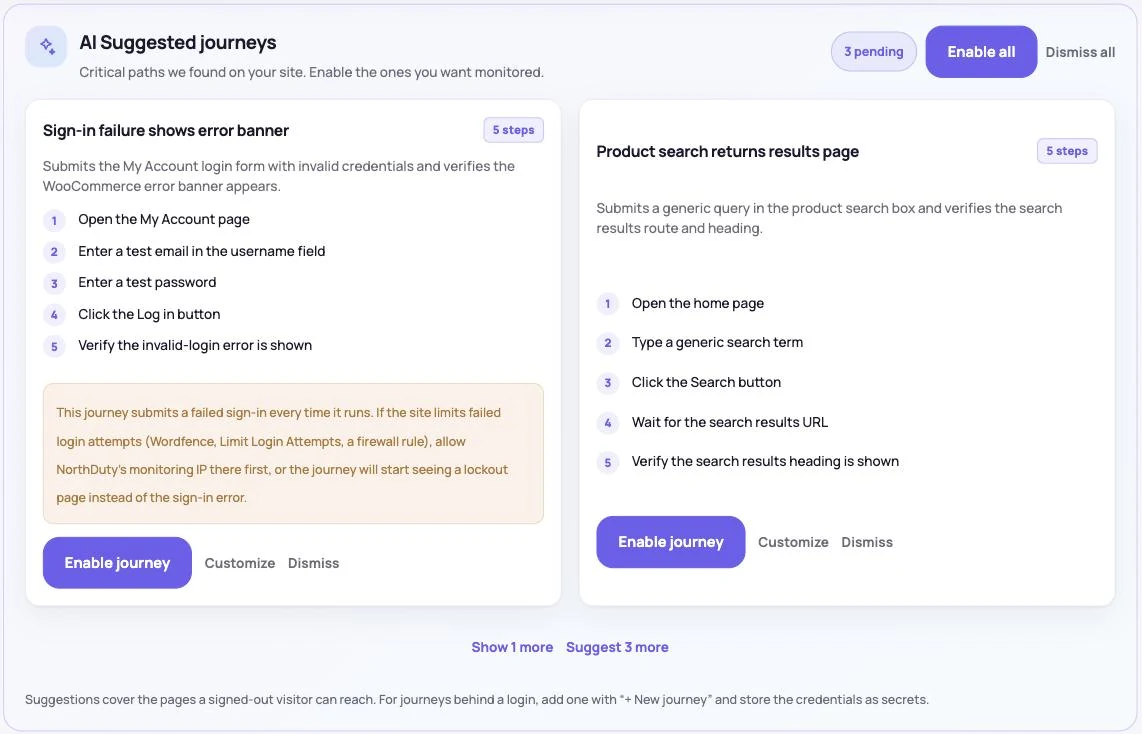
NorthDuty runs your checkout, signup, login and form flows in a real browser on a schedule and reports the exact step that failed, with a screenshot.
Explore User Journey MonitoringComparison
Uptrends competitors compared: NorthDuty, Checkly, Site24x7, Pingdom, Better Stack, UptimeRobot and Hyperping on transaction monitoring and 2026 pricing.
Compare UptrendsComparison
Checkly alternatives compared: no-code journeys vs Playwright check runs, what run quotas mean in practice, and 2026 pricing for 5 alternatives.
Compare ChecklyPricing
NorthDuty plans are sized by how many checkout, signup and login journeys you monitor: Free, $29 Starter, $79 Pro, $199 Business. 7-day trial, no card.
Compare pricing plansMore NorthDuty guides on related website monitoring topics.
Article
How to choose an uptime monitoring tool: what to look for beyond a simple ping, the main categories of tool, and where deeper page health monitoring fits.
Read Best Uptime Monitoring ToolsArticle
8 WooCommerce monitoring tools compared on real checkout testing, check frequency, multi-store pricing and cost — CheckView, Shopwarden, ShopMonitor and more.
Read Best WooCommerce Monitoring Tools (2026)Article
How to set up a public status page for your website: what to include, how to manage incidents, and how to schedule maintenance so customers stay informed.
Read How to Set Up a Public Status PageShort answers that summarize the practical takeaways from this guide.
For plain uptime, UptimeRobot's free plan (50 monitors, 5-minute checks) is hard to beat, and Site24x7's Web Uptime at $9/month annual covers 25 sites. Cheapest changes entirely once you need multi-step checks — those are priced per flow, per run or per Playwright minute depending on the vendor. Prices checked 18 September 2026.
Site24x7 (web transaction monitors), Pingdom (advanced checks), Checkly (Playwright code), Uptrends and NorthDuty (no-code journeys). UptimeRobot does not offer multi-step checks, and Better Stack bills browser checks separately by Playwright minute.
The best tool depends on the problem you need to solve. Some teams only need uptime monitoring, while others need page health, user journey, JavaScript, and browser-side API call visibility.
Compare them based on the pages and customer journeys you need to protect, the depth of visibility you need, and how easy the alerts and workflows are for your team.
You need more than uptime monitoring when pages can be online but still fail users through missing UI, broken forms, checkout issues, JavaScript errors, or API problems.
Use NorthDuty if you need a website monitoring tool that goes beyond uptime and helps you detect the customer-facing failures that actually affect revenue and trust.
7 days with Pro features and limits, no credit card — then keep one daily journey on the free plan.