Missing buttons & CTAs
Catches when Buy Now, Start Free Trial, Contact Sales, or other conversion-critical actions disappear or move.
NorthDuty is screenshot monitoring and visual regression testing for live websites: it captures screenshots and compares them pixel-by-pixel against previous baselines, so website change detection happens automatically and unexpected design or layout changes surface as a visible diff for review.
Catch layout shifts and missing UI with pixel diffs — no test code to maintain.
A release, CMS edit, plugin update, third-party script, or A/B test can change a page in ways no uptime check will catch. A button can move, a form can disappear, a pricing block can break, or a layout can shift enough to hurt the next user action.
Traditional visual regression testing means writing and maintaining Playwright or Cypress snapshot scripts. NorthDuty does screenshot monitoring without code: it captures scheduled screenshots for the project and supports managed URL screenshot sets for broader reviews, then compares later captures pixel-by-pixel against previous screenshots. You see the diff image, the changed percentage, and the page that changed — website change detection that tells you whether the change was expected.
Useful anywhere visible page quality affects leads, sales, signups, or trust.
Catches when Buy Now, Start Free Trial, Contact Sales, or other conversion-critical actions disappear or move.
Detects spacing changes, broken grids, overlapping elements, and structural changes after deploys.
Surfaces pricing edits, hero swaps, navigation changes, and other content that may have been changed unintentionally.
After a deploy or CMS push, scan the diffs across every monitored page in one place.
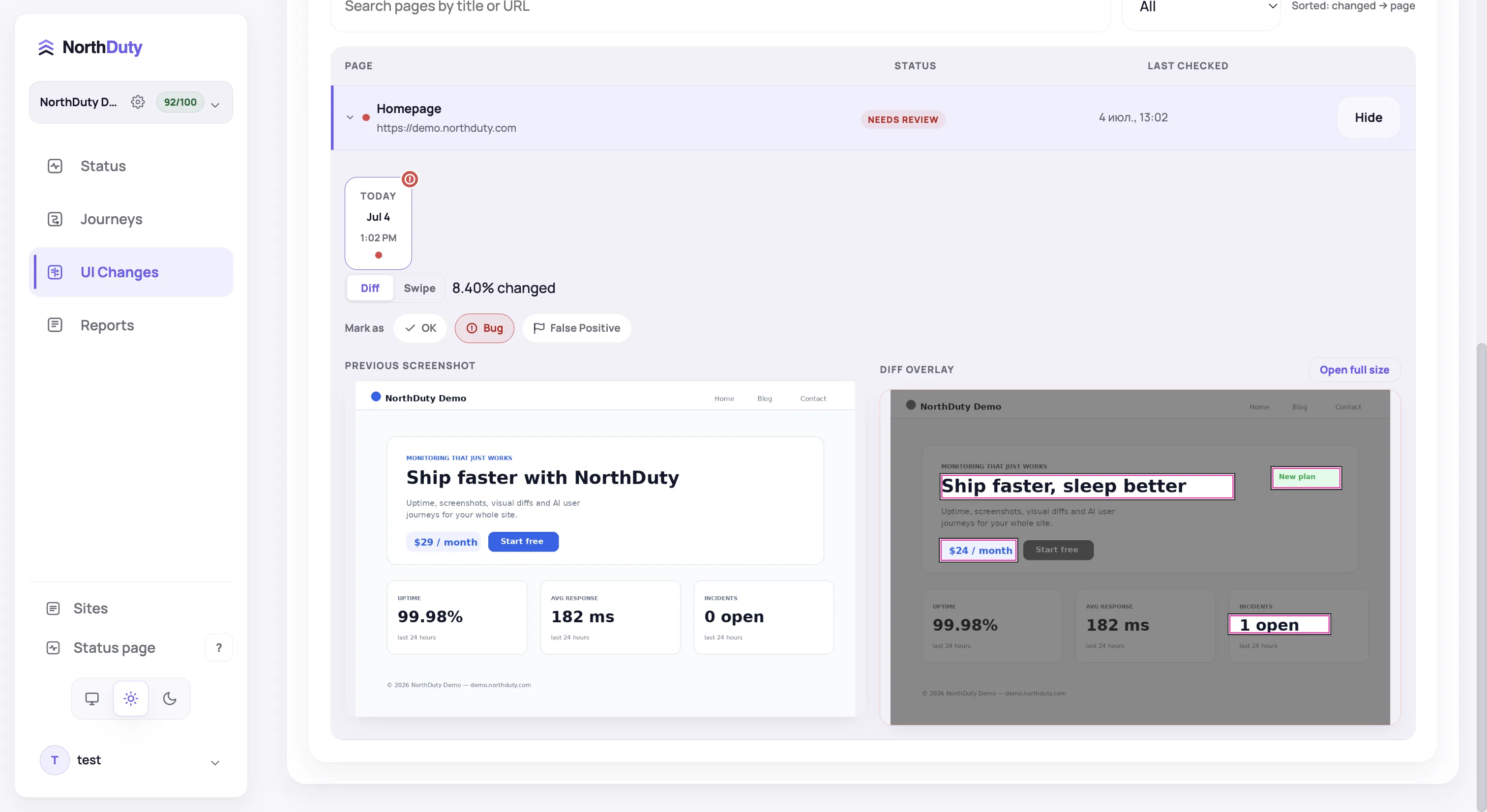
The UI Changes view shows the monitored URL, latest comparison status, changed percentage, previous screenshot, and diff overlay.
Use the comparison screen to confirm whether a monitored page changed visually, then open the full-size capture when you need more detail.
If a page depends on clear visual structure, visual changes are business risk — not just design noise.
It runs automatically on every project, with daily or weekly visual-change cadence available in settings.
Once a project exists, NorthDuty can capture the base URL and any managed URLs discovered or added for broader screenshot sets — no scripts to write.
On each run, the page is stabilized and captured. The capture becomes the new candidate for comparison.
NorthDuty calculates a pixel-level diff between today's capture and the previous one, and reports how much of the page changed.
Open the diff image to see exactly what moved or disappeared, then decide whether the change was expected or needs investigation.
Explore pricing, feature details, solution pages, and related tools connected to this website monitoring use case.
Pricing
NorthDuty pricing for website monitoring: Free, $29 Starter, $79 Pro, $199 Business, and $499 Enterprise plans.
Compare pricing plansHub
Explore NorthDuty features: website health checks every 5 minutes, screenshot-based visual change detection, and AI-suggested user journey monitoring in one project.
Browse FeaturesHub
Explore NorthDuty solutions for ecommerce website monitoring, SaaS website monitoring, agency website monitoring, and startup website monitoring.
Browse SolutionsFeature
Learn how NorthDuty combines health checks, screenshot diffs, and editable user journeys in one website monitoring project.
Explore Website MonitoringFeature
Monitor uptime every 5 minutes by default with HTTP, SSL, DNS, blank-page detection, broken resources, JavaScript errors, and API call tracking.
Explore Uptime MonitoringFeature
NorthDuty AI suggests 2-5 website journeys. Enable them in one click or describe a custom multi-step flow in plain text.
Explore User Journey MonitoringSolution
Use NorthDuty for ecommerce website monitoring to protect product pages, cart, checkout, payments, and revenue-critical customer journeys.
View Ecommerce Website MonitoringAnswers to common questions about this monitoring feature and when teams should use it.
Visual regression testing compares how a page looks now against a previous baseline to catch unintended visual changes. NorthDuty takes screenshots and compares them pixel-by-pixel with previous screenshots, so differences surface as a visible diff image — no test scripts required.
Yes. Unlike Playwright or Cypress snapshot testing, NorthDuty runs screenshot monitoring automatically on every project. You add a URL and visual change detection runs on a schedule — there is nothing to script or maintain.
On each run NorthDuty captures the page, stabilizes it, and calculates a pixel-level diff against the previous capture. It reports the changed percentage and a diff overlay so you can see exactly what changed and decide whether it was expected.
Daily by default. The screenshot monitoring cadence is configurable per project.
Yes. If a button, form, or page section disappears or moves enough to affect the screenshot, the pixel diff surfaces that change for review.
No. NorthDuty stores successful screenshots and uses the selected or latest completed screenshot set as the baseline for later comparisons.
Get screenshot-based visual regression testing and website change detection for important pages so unexpected design or layout changes are easy to review.
Start on the free plan — add your base URL and monitoring starts in minutes.