Homepage and top landing pages
These pages often drive the most traffic and shape first impressions for prospects and customers.
Website uptime monitoring is one of the simplest ways to protect revenue, leads, and customer trust. The goal is to know when an important page becomes unavailable before users start telling you about it.
Start your 7-day trial — no credit card, free plan after.
What real uptime monitoring checks — and the signals a basic ping misses.
Most businesses depend on a small set of pages to drive results. That may be the homepage, a pricing page, a signup path, a checkout flow, or a campaign landing page. If one of those pages goes down, the impact starts immediately.
Manual checking is not enough. By the time someone notices a problem, the outage may already have cost traffic, conversions, and customer trust. A website monitoring tool closes that gap by checking key pages continuously.
Start by choosing the pages that matter most to the business, not every page on the site. Monitor the routes tied directly to sales, signups, support, or account access.
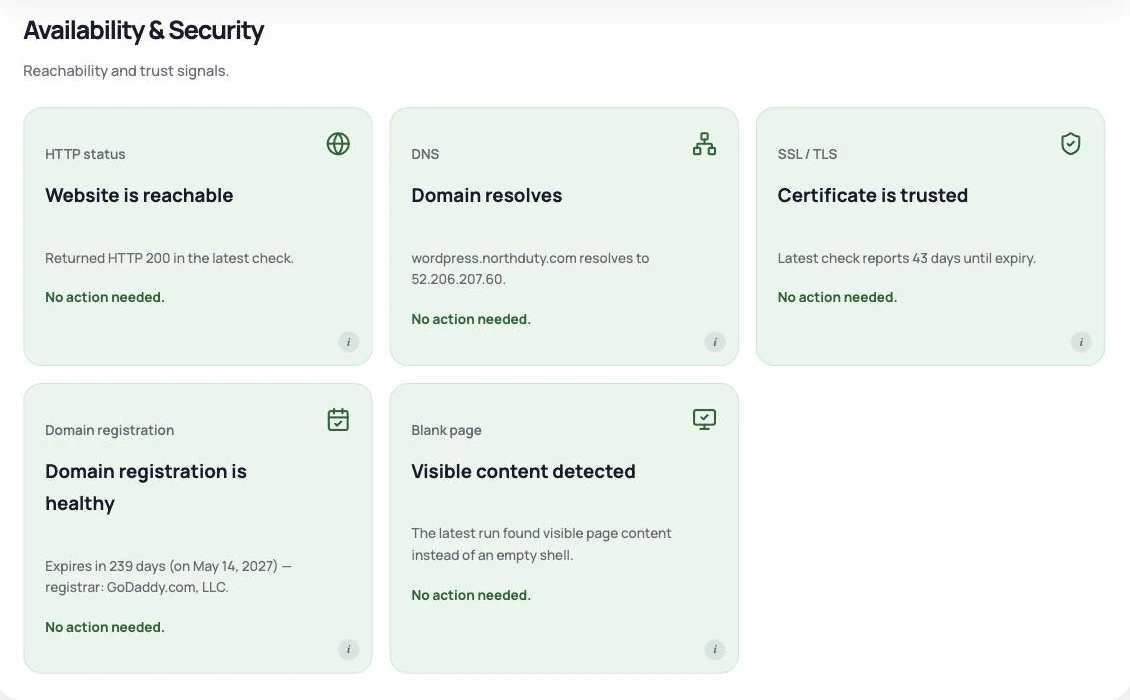
NorthDuty monitors uptime with a real Chromium browser, not a simple HTTP ping. That means SSL validity, DNS resolution, blank-page detection, JavaScript errors, API call tracking, and performance are all captured in the same check that confirms whether the page responded. The result feeds a 0–100 health score built from four weighted components — Uptime (30), Performance (25), Errors (15), and Stability (10) — normalized over whatever was measured.
On the Uptime component specifically: a healthy HTTP response contributes a full score. A navigation error deducts 25 points, an invalid SSL certificate deducts 25 points, an SSL certificate expiring within 7 days deducts 15 points, and expiry within 30 days deducts 5 points. Checks run every 1, 5, or 15 minutes per project.
Finally, make sure alerts reach the right people quickly. NorthDuty supports nine alert channels including email, Slack, Discord, Teams, Google Chat, webhooks, Telegram, WhatsApp, and SMS. Uptime monitoring works best when it leads to fast action, not just a dashboard that someone checks later.
Choose pages where downtime creates immediate business pain.
These pages often drive the most traffic and shape first impressions for prospects and customers.
If users cannot log in, the support burden rises quickly and trust drops fast.
These pages sit close to revenue and usually deserve continuous monitoring.
For ecommerce teams, these are some of the most expensive pages to leave unmonitored.
A few simple decisions make uptime monitoring much more useful.
Uptime is the floor. It is worth having on every site, and it is worth being clear about its blind spots.
| Failure | Does an uptime check catch it? | What does |
|---|---|---|
| Server down, DNS failure, expired domain | Yes | Uptime checks |
| SSL certificate expired | Usually, as a failed HTTPS request | SSL expiry monitoring gives days of warning instead |
| Page returns 200 but renders blank | No — the status code is fine | A rendered health check |
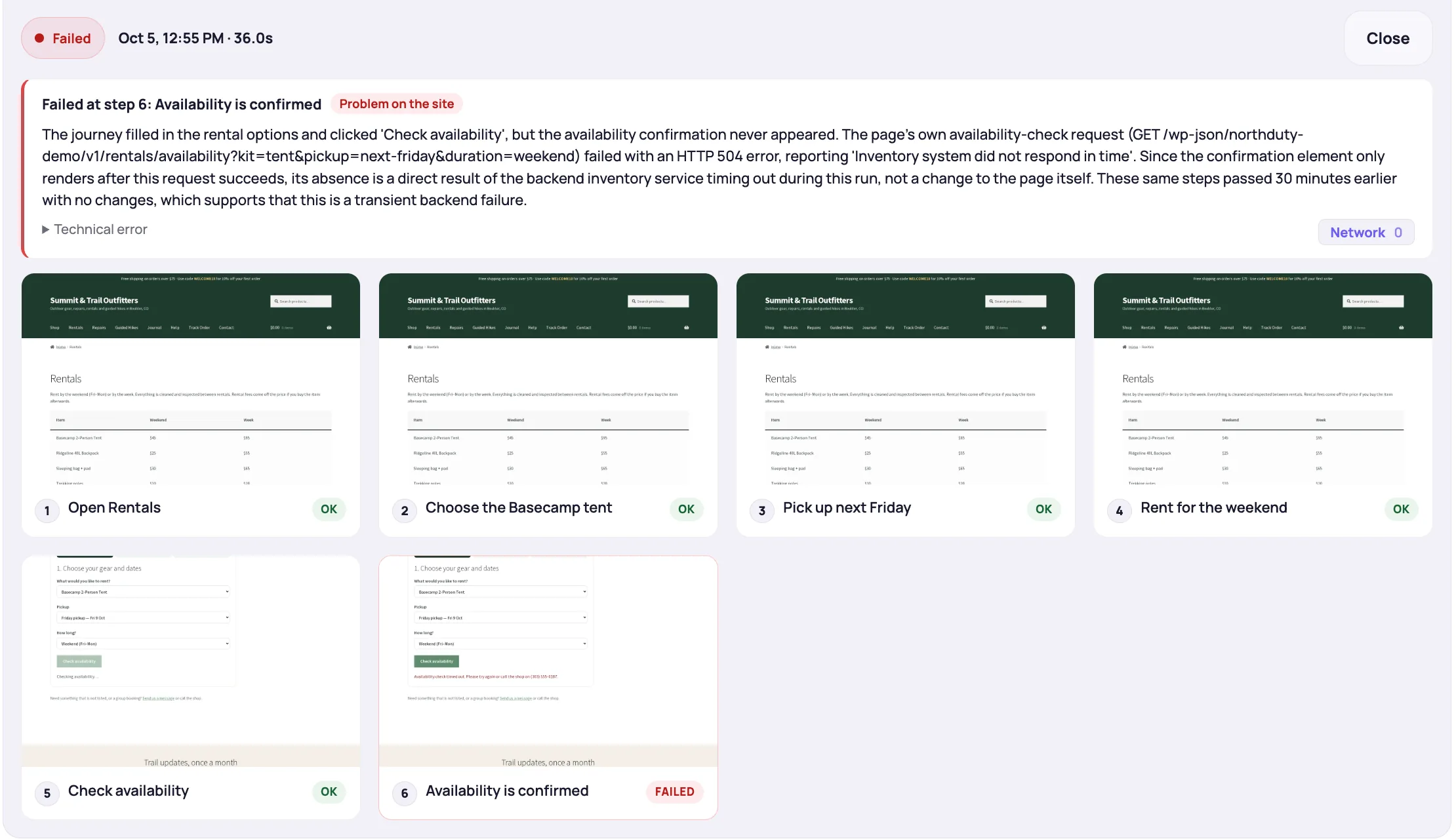
| Add to cart or checkout stops working | No | A real-browser journey |
| Contact form submits but sends nothing | No | A journey that checks the destination |
| Layout broken by an update | No | A journey that fails at the missing element, with a screenshot |
| A third-party script fails | No | JavaScript error capture during a rendered check |
Every 1 to 5 minutes is the right range for anything that earns money: at a 15-minute interval an outage can run most of an hour before anyone knows. Confirm failures from a second location before alerting, which removes most false alarms without delaying real ones.
Then decide what a check actually does. Requesting a URL proves the server answered. Rendering the page in a real browser proves it drew. Running a journey proves a customer could act. Most sites need the first on everything, and the third on the two or three flows that matter.
If your website drives revenue, signups, or customer access, uptime monitoring is not optional. It is the fastest way to reduce the delay between a page going down and your team finding out.
NorthDuty helps teams move beyond manual checks by monitoring important pages continuously and connecting uptime to broader website health and journey monitoring.
Keep exploring the feature pages and commercial routes connected to this topic.
Feature
Monitor uptime every 5 minutes by default with HTTP, SSL, DNS, blank-page detection, broken resources, JavaScript errors, and API call tracking.
Explore Uptime MonitoringPricing
NorthDuty plans are sized by how many checkout, signup and login journeys you monitor: Free, $29 Starter, $79 Pro, $199 Business. 7-day trial, no card.
Compare pricing plansMore NorthDuty guides on related website monitoring topics.
Article
Synthetic monitoring vs uptime monitoring: ten real failures run past both, why each costs what it does, and why almost every site needs both rather than one.
Read Synthetic Monitoring vs Uptime MonitoringArticle
How to choose an uptime monitoring tool: what to look for beyond a simple ping, the main categories of tool, and where deeper page health monitoring fits.
Read Best Uptime Monitoring ToolsArticle
Uptime monitoring checks whether your server responds, but it can't see broken checkouts, failed forms, or broken user journeys. Here's what you're missing.
Read What Is Uptime Monitoring?Short answers that summarize the practical takeaways from this guide.
No. It proves the server answered, not that the site works. Blank pages, broken layouts, failed forms and checkout errors all return HTTP 200. Uptime is the floor — add rendered page checks and a journey on each flow that makes money.
Use a browser-based check — not a simple ping — on the pages that matter most to the business. That way you catch not just full outages but also SSL expiry, blank pages, and JavaScript failures that a 200 response check would miss. Set alerts so the right people know immediately.
Start with the homepage, landing pages, pricing pages, product pages, login, signup, and checkout routes because they usually have the most direct business impact.
The 0–100 health score has four weighted components: Uptime (30), Performance including load time, FCP, and LCP (25), Errors including JavaScript and API failures (15), and Stability including blank-page detection and CLS (10), normalized over whatever was measured. Security, accessibility, and SEO are scored separately, and journeys are reported on their own.
It is a strong starting point, but most important websites also need broader health monitoring. Pages can return 200 OK while still being blank, slow, or throwing JavaScript errors.
Use NorthDuty to monitor website uptime continuously so you can catch outages on the pages that drive traffic, sales, and customer access.
7 days with Pro features and limits, no credit card — then keep one daily journey on the free plan.